Monday, 4 August 2014

Internet Information Services(IIS) reveals its real or internal IP Address


In the ever changing world of global data communications, inexpensive Internet connections, and fast-paced software development, security is becoming more and more of an issue. Security is now a basic requirement because global computing is inherently insecure.

Keeping that in mind, we recently ran our flagship product through a security audit. It was such a helpful exercise in tying-off any remaining lose ends in our application in terms of application security. 

Based on the security audit report, there was a relatively minor issue that appeared when accessing the /images directory of our application. Turns out that the Location response header of the 301 request returns an Internal IP address. The issue is detailed below.


Issue reported

Internet Information Services (IIS) may reveal its real or internal IP address in the Location header via a request to the /images directory. The value returned whilst pen testing is https://10.0.0.10/images.


The risk

Information regarding internal IP address ranges is usually hidden from internet facing systems and can provide an attacker with useful information about internal network structure which can be later used in a targeted attack. 


The recommendation

As a matter of best practice, internal information should be removed or masked.


Understanding the Issue

When the /images directory is requested, IIS ensures that /images directory has “Directory Browsing” enabled. If it is not enabled and the directory does not have a Default.html/htm page within the directory, a “Forbidden” page needs to be shown.

When the request method used is HTTP/1.0, the Location response header of the 301 request returns an Internal IP address. This needs to be mitigated! 

In terms of HTTP Headers, the following 2 request, responses are made:
  • Response Code 301 /images => /images/
  • Response Code 403 Forbidden
The actual interactions between the browser and server are listed below.

* Response Code 301 /images => /images/

The request
Remote Address
10.0.0.10: 443
Request URL
https://dev-2008-iis01.pv.local/images
Request Method
GET
Status Code
301 Moved Permanently

Request headers
Accept
text/html,application/xhtml+xml,application/xml;q=0.9,image/webp,*/*;q=0.8
Accept-Encoding
gzip,deflate,sdch
Accept-Language
en-US,en;q=0.8
Connection
keep-alive
Cookie
ASP.NET_SessionId=e5hlhemgbpcu0a3k0dphke5y; __RequestVerificationToken=ufS2rtMQMEHuRRQdV8umKRyJF4LMN4Pt9tNbF2QEDxQhvLWlZiycwD_vYNVlUwi6858t5-m8oLvW1CppLT1VuXVPeLE1
Host
development-server-iis.local
User-Agent
Mozilla/5.0 (Windows NT 6.1; WOW64) AppleWebKit/537.36 (KHTML, like Gecko) Chrome/36.0.1985.125 Safari/537.36

Response headers
Content-Length
162
Content-Type
text/html; charset=UTF-8
Date
Tue, 22 Jul 2014 03:27:31 GMT
Location
https://development-server-iis.local/images
Server
Microsoft-IIS/7.5
X-Powered-By
ASP.NET


* Response Code 403 Forbidden

The request
Remote Address
10.0.0.10:443
Request URL
https://development-server-iis.local/images/
Request Method
GET
Status Code
403 Forbidden

Request headers
Accept
text/html,application/xhtml+xml,application/xml;q=0.9,image/webp,*/*;q=0.8
Accept-Encoding
gzip,deflate,sdch
Accept-Language
en-US,en;q=0.8
Connection
keep-alive
Cookie
ASP.NET_SessionId=e5hlhemgbpcu0a3k0dphke5y; __RequestVerificationToken=ufS2rtMQMEHuRRQdV8umKRyJF4LMN4Pt9tNbF2QEDxQhvLWlZiycwD_vYNVlUwi6858t5-m8oLvW1CppLT1VuXVPeLE1
Host
development-server-iis.local
User-Agent
Mozilla/5.0 (Windows NT 6.1; WOW64) AppleWebKit/537.36 (KHTML, like Gecko) Chrome/36.0.1985.125 Safari/537.36

Response headers
Content-Length
1233
Content-Type
text/html
Date
Tue, 22 Jul 2014 04:0:16 GMT
Server
Microsoft-IIS/7.5
X-Powered-By
ASP.NET


Verification of the exploit

As you saw in the initial response header from the server, the Location header (highlighted in red) does not actually reveal an IP address (which is what we want).

This is deceiving as it turns out, IIS may reveal the internal IP Address if the request method is HTTP/1.0 instead of HTTP/1.1

To verify this issue, I used https://development-server-iis.local/images/. As this issue is reproducible in HTTP/1.0, we can verify it via TELNET.Using TELNET, make the request as follows:

telnet /images HTTP/1.0

The following Response is received:


The resolution

As IIS server sometimes leaks its internal IP address in a header field, to combat it we can specify the host name to use for redirection. To do so, we will use “ServerRuntime”.

The <serverRuntime> element configures the following settings that are related to the Internet Information Services (IIS) 7 server runtime:
  • Setting the enabled attribute to true will configure IIS 7 to serve content on the URL where the <serverRuntime> element is configured; setting the enabled attribute to false will configure IIS 7 to not serve content for that URL.
  • The alternateHostName attribute specifies a host name that is different from the computer name in the HTTP Content-location head
Note: This is compatible in the following versions:
VersionNotes
IIS 8.5The <serverRuntime> element was not modified in IIS 8.5.
IIS 8.0The <serverRuntime> element was not modified in IIS 8.0.
IIS 7.5The authenticatedUserOverride attribute was added in IIS 7.5.
IIS 7.0The <serverRuntime> element was introduced in IIS 7.0.
IIS 6.0The <serverRuntime> element replaces the following IIS 6.0 metabase properties:
  • SetHostName
  • MaxRequestEntityAllowed
  • UploadReadAheadSize

    Information you need

    Before you commence, you will need to know the 

    Name of website
    This is visible in “Internet Information Services Manager” (inetmgr)
    As you can see, in our case, the name of the Website is “WebTier”


    Host Name
    In our case, the name of the host was “development-server-iis.local”

    Steps to resolve

    1. Log into the server that hosts the Web Tier of Support Point application as an Administrator and open an administrator command prompt.
    2. Navigate to AppCmd.exe (is located in the %systemroot%\system32\inetsrv\)
    3. Using AppCmd enable server runtime for your Application using the following command
      appcmd.exe set config "WebTier" -section:system.webServer/serverRuntime /enabled:"True" /commit:apphost (Note: Here you will need to replace WebTier with the name of your website.)
    4. Using AppCmd enable server runtime for your Application using the following command
      appcmd.exe set config "WebTier" -section:system.webServer/serverRuntime /alternateHostName:"development-server-iis.local" /commit:apphost (Note: Here you will need to replace WebTier with the name of your website. You will also need to replace development-server-iis.local with your host name.)
    5. Restart the website via “Internet Information Services Manager” (inetmgr)


    Verification of Resolution

    To verify if this has resolved the issue, we can use telnet in a similar way to when we verified the existence of the exploit. The response received shows that the issue has been resolved.

    Using TELNET, make the request as follows:

    telnet /images HTTP/1.0

    The following Response is received:


    References: http://www.iis.net/configreference/system.webserver/serverruntime

    Tuesday, 18 March 2014

    jQuery Attribute Wildcard Selectors

    You most likely already know it but I thought I'd highlight some common wildcard selector patters that can be used in jQuery .. I've added a jsFiddle here (http://jsfiddle.net/roeburg/mkTvx/) ..

    Attribute Contains Prefix Selector [name|="value"]

    Selects elements that have the specified attribute with a value either equal to a given string or starting with that string followed by a hyphen (-). (jQuery Api Link :  http://api.jquery.com/attribute-contains-prefix-selector/)


    Attribute Contains Selector [name*="value"]

    This is the most generous of the jQuery attribute selectors that match against a value. It will select an element if the selector's string appears anywhere within the element's attribute value. Compare this selector with the Attribute Contains Word selector (e.g. [attr~="word"]), which is more appropriate in many cases. (Jquery Api Link: http://api.jquery.com/attribute-contains-selector/)


    Attribute Ends With Selector [name$="value"]

    Selects elements that have the specified attribute with a value ending exactly with a given string. The comparison is case sensitive. (jQuery Api Link: http://api.jquery.com/attribute-ends-with-selector/)


    Attribute Contains Word Selector [name~="value"]

    Selects elements that have the specified attribute with a value containing a given word, delimited by spaces. This selector matches the test string against each word in the attribute value, where a "word" is defined as a string delimited by whitespace. The selector matches if the test string is exactly equal to any of the words. (jQuery Api Link: http://api.jquery.com/attribute-contains-word-selector/)


    There are of course others ..

    Sunday, 2 February 2014

    JavaScript Did You Know? #Ramblings


    I've been told on more than one occasion that I tend to ramble. But then again who doesn't from time to time ey? What I meant to ramble on about were some interesting JavaScript constructs, patterns, code .. etc

    Self Executing Anonymous Functions and Document.Ready

    While they can be really helpful, its always important to understand how and when they get executed. In case you'd like to know more about Self Executing Anonymous functions, here's a post by Mark Dalgleish  http://markdalgleish.com/2011/03/self-executing-anonymous-functions/

    <div class="before">
        Before Div. This content will change!
    </div>
    <script>
        (function () {
            $(".before").html("Since the div is declared before the script block, its loaded and we're able to manipulate it.");
            $(".after").html("The div declared after the script block is not yet loaded, we're not able to do anything!");
        })()
    </script>
    <div class="after">
        After Div. This content will not change.
    </div>
    

    As you may expect, the HTML elements declared before the script block will be loaded. The elements declared after the script block would not have been loaded and hence unavailable for any manipulation. (JsFiddle Link: http://jsfiddle.net/roeburg/j2r4U/ ). This behaviour is quite different from document.ready where the code is executed only when all the dom elements have been loaded! (Jsfiddle Link: http://jsfiddle.net/roeburg/Cy62T/2/)

    Comparison Operators == and === 

    JavaScript has both strict and Type–converting (abstract) comparisons.A strict comparison (e.g., ===) is only true if the operands are the same Type. The more commonly used abstract comparison (e.g., ==) converts the operands to the same Type before making the comparison. For relational abstract comparisons (e.g., <=), the operands are first converted to primitives, then the same Type, before comparison. (More Examples: http://goo.gl/vqJ8ek)

    Arithmetic Operations on Strings V/s Numbers

    <div>"1" + 2 + 3 = <span class="answer1"></span></div>
    
    <div>1 + "2" + 3 = <span class="answer2"></span></div>
    
    <div>1 + 2 + "3" = <span class="answer3"></span></div>
    
    <div>1 + 2 + 3 = <span class="answer4"></span> </div>
    
    <script>
    $(function () {
        var ans1 = "1" + 2 + 3;
        $(".answer1").html(ans1);
        
        var ans2 = 1 + "2" + 3;
        $(".answer2").html(ans2);
        
        var ans3 = 1 + 2 + "3";
        $(".answer3").html(ans3);
        
        var ans4 = 1 + 2 + 3;
        $(".answer4").html(ans4);
    })
    </script>
    

    (JsFiddle Link: http://jsfiddle.net/roeburg/N5RhP/1/)

    JavaScript Scoping and Hoisting

    JavaScript has two scopes: global and local. A variable that is declared outside a function definition is a global variable, and its value is accessible and modifiable throughout your program. A variable that is declared inside a function definition is local. It is created and destroyed every time the function is executed, and it cannot be accessed by any code outside the function. JavaScript does not support block scope (in which a set of braces {. . .} defines a new scope), except in the special case of block-scoped variables. (JsFiddle Link: http://jsfiddle.net/roeburg/pp9Pv/)

    $(function () {
        // Global definition of aCentaur.
        var aCentaur = "a horse with rider,";
    
        // A local aCentaur variable is declared in this function.
        function antiquities() {
    
            var aCentaur = "A centaur is probably a mounted Scythian warrior";
        }
    
        antiquities();
        aCentaur += " as seen from a distance by a naive innocent.";
    
        $("div").html(aCentaur);
    
        // Output: "a horse with rider, as seen from a distance by a naive innocent."
    })
    

    In JavaScript function declarations and variable declarations are 'hoisted' i.e. are silently moved to the very top of the scope.

    (JsFiddle Link: http://jsfiddle.net/roeburg/vNhLp/)


    Tuesday, 8 October 2013

    Validating Anti-Forgery Tokens over AJAX using MVC 4


    In ASP.NET MVC, the HtmlHelper.AntiForgeryToken Method generates a hidden form field (anti-forgery token) that is validated when the form is submitted.

    This method is essential in preventing Cross-Site Request Forgery (CSRF) attacks by using the @Html.AntiForgeryToken() helper.

    What is Cross-Site Request Forgery you ask? 

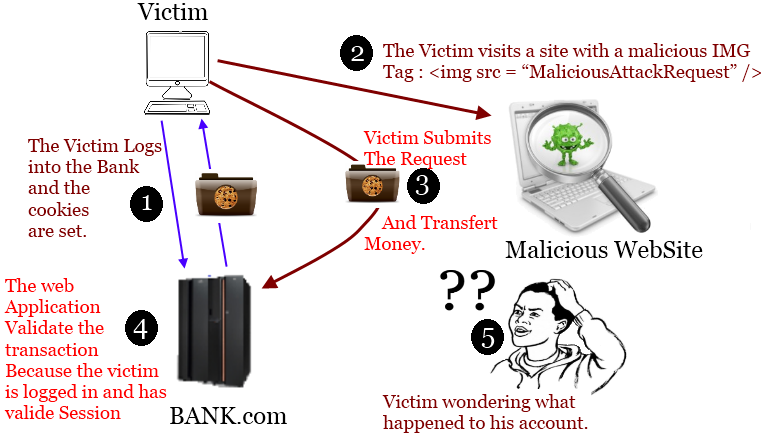
    Cross-Site Request Forgery (CSRF) is an attack that tricks the victim into loading a page that contains a malicious request. It is malicious in the sense that it inherits the identity and privileges of the victim to perform an undesired function on the victim's behalf, like change the victim's e-mail address, home address, or password, or purchase something. CSRF attacks generally target functions that cause a state change on the server but can also be used to access sensitive data.

    For most sites, browsers will automatically include with such requests any credentials associated with the site, such as the user's session cookie, basic auth credentials, IP address, Windows domain credentials, etc. Therefore, if the user is currently authenticated to the site, the site will have no way to distinguish this from a legitimate user request.

    In this way, the attacker can make the victim perform actions that they didn't intend to, such as logout, purchase item, change account information, retrieve account information, or any other function provided by the vulnerable website.

    Sometimes, it is possible to store the CSRF attack on the vulnerable site itself. Such vulnerabilities are called Stored CSRF flaws. This can be accomplished by simply storing an IMG or IFRAME tag in a field that accepts HTML, or by a more complex cross-site scripting attack. If the attack can store a CSRF attack in the site, the severity of the attack is amplified. In particular, the likelihood is increased because the victim is more likely to view the page containing the attack than some random page on the Internet. The likelihood is also increased because the victim is sure to be authenticated to the site already.

    Synonyms: CSRF attacks are also known by a number of other names, including XSRF, "Sea Surf", Session Riding, Cross-Site Reference Forgery, Hostile Linking. Microsoft refers to this type of attack as a One-Click attack in their threat modeling process and many places in their online documentation.

    The @Html.AntiForgeryToken() helper

    Steven Sanderson's blog post "Prevent Cross-Site Request Forgery (CSRF) using ASP.NET MVC’s AntiForgeryToken() helper" is quite self explanatory on how to use the helper, but lets see how we can achieve this with our ajax requests as well.

    Let's start with the JavaScript code. 

    The easiest thing to do would be to create a custom ajax function where we can add the required data to pass to the server. Always good to add this layer of abstraction so that you can attach custom error handlers & what not.


    //=============================================================
    // This document contains common utilities that can be used in
    // your Application (app). 
    //=============================================================
    (function (app, $) {
        app.getAntiForgeryToken = function () {
            return $('[name=__RequestVerificationToken]').val();
        };
    
        // Create a custom ajax function
        app.ajax = function(options) {
            
            // (a): Add the anti forgery tokens
            options.headers = options.headers || {};
            options.headers.__RequestVerificationToken = app.getAntiForgeryToken();
    
            // (b): Make the ajax call
            $.ajax(options);
            
        };
    })(this.app = this.app || {}, jQuery);
    

    So instead of calling $.ajax use app.ajax.

    On your razor view

    You simply add the call  to @Html.AntiForgeryToken(). This should generate in your html a hidden input field that looks like so ..


    Your Controller

    Decorate the controller with the "ValidateAntiForgeryTokenOnAllPosts" authorize attribute and add a definition for it.

     
        [AttributeUsage(AttributeTargets.Class)]
        public class ValidateAntiForgeryTokenOnAllPosts : AuthorizeAttribute
        {
            public override void OnAuthorization(AuthorizationContext filterContext)
            {
                var request = filterContext.HttpContext.Request;
    
                //  Only validate POSTs
                if (request.HttpMethod == WebRequestMethods.Http.Post)
                {
                    //  Ajax POSTs and normal form posts have to be treated differently when it comes
                    //  to validating the AntiForgeryToken
                    if (request.IsAjaxRequest())
                    {
                        var antiForgeryCookie = request.Cookies[AntiForgeryConfig.CookieName];
    
                        var cookieValue = antiForgeryCookie != null
                            ? antiForgeryCookie.Value
                            : null;
    
                        AntiForgery.Validate(cookieValue, request.Headers["__RequestVerificationToken"]);
                    }
                    else
                    {
                        new ValidateAntiForgeryTokenAttribute()
                            .OnAuthorization(filterContext);
                    }
                }
            }
        }
    

    Don't forget to annotate your controller like so ..


    **Note: This code is courtesy of @Richiban which made my work a whole lot easier. (http://richiban.wordpress.com/2013/02/06/validating-net-mvc-4-anti-forgery-tokens-in-ajax-requests/)

    Further Reading (http://www.diaryofaninja.com/blog/2014/01/29/htmlantiforgerytoken-ndash-balancing-security-with-usability)

    Wednesday, 25 September 2013

    Venturing into the Revealing Module Pattern with JavaScript


    I came across Addy Osmani's blog post about Learning JavaScript Design Patterns the other day. Loved it!

    I think I'm one of those silly developers that gets super-duper excited when I see something that I like and then get to put it in practice. Well, I did exactly that. :)

    I loved what Addy said about design patterns:
    "Patterns are not an exact solution. It’s important that we remember the role of a pattern is merely to provide us with a solution scheme. Patterns don’t solve all design problems nor do they replace good software designers, however, they do support them".  
    Let's get into it then ..

    I was writing a rule engine for a part of our application. As you can see in the code below, the sp.editor.rules namespace contains the methods such as MeetsButtonCriteria that I can call.

     
    $(function () {
        if (sp && sp.editor) {
            // Initialise the rules namespace
            sp.editor.rules = sp.editor.rules || {};
            
            // Private methods
            sp.editor._AreMultipleNodesSelected = function () {
                // Logic goes here.
            };
    
    
            // Rules for buttonize
            sp.editor.rules.MeetsButtonCriteria = function (editor) {
                if (sp.editor._AreMultipleNodesSelected(editor)) {
                    // More Code Here ..
                } else {
                    // More Code Here ..
                }
    
                return true; // Temp Return True
            };
        }
    });
    

    The namespace also contains other helper methods that MeetsButtonCriteria calls such as _AreMultipleNodesSelected. In the code I simply used a convention that private methods begin with an underscore.

    While that seems to do the trick, I still found that rather clunky and non-defensive. This is where I thought that the Revealing Module Pattern might help.

    The main benefit of the pattern is that the pattern allows the syntax of our scripts to be more consistent. It also makes it more clear at the end of the module which of our functions and variables may be accessed publicly which eases readability.

    So this is what the modified script looks like.
     
    sp.editor.rules = function () {
        // Declare the Private Functions Here!
        
        var areMultipleNodesSelected = function () {
            // Logic goes here.
        };
        
        var meetsButtonCriteria = function (editor) {
            if (areMultipleNodesSelected(editor)) {
                // More Code Here ..
            } else {
                // More Code Here ..
            }
    
            return true; // Temp Return True
        };
    
        // This is what gets returned (REVEALED).
        return {
            MeetsButtonCriteria: meetsButtonCriteria
        };
    }();
    

    Easy-peasy na? Also, just a word of advise, I forgot to convert sp.editor.rules to a self executing function and spent like 15 minutes trying to figure out what was wrong. Yikes! So don't forget that.

    Sunday, 8 September 2013

    Hack-ED with Kirk Jackson & Andy Prow


    TechED 2013

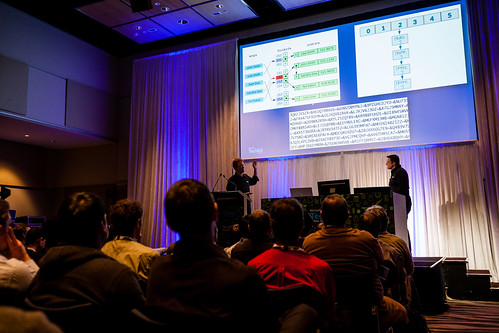
    I recently attended 2 amazingly fun filled Hack-Ed sessions at Microsoft's TechEd, Australia. The speakers were Kirk Jackson and Andy Prow. And as promised, there was live hacking on stage and awkward humour that will made us cringe (in a good way). Not to mention, I won a chocolate bar! Yay!

    I have posed a link to both their sessions below but I though I'd quickly touch on a few important things that they spoke about. I also highly recommend you follow their blog at http://www.hack-ed.com/.

    Kirk and Andy went through a couple of recent security breaches around the world (I've listed a few below). But what was really funny was that most of them were easily preventable.

    I know you've probably heard this before, but as web developers, security should not be an after-thought to the development process, but rather an integral part of your design. I highly recommend that you have a read through the Open Web Application Security Project (OWASP). They have recently updated their list of top 10 vulnerabilities to look out for, available at https://www.owasp.org/index.php/Top_10_2013-Top_10.

    Interesting Security Breaches

    Now here are some of the interesting attacks that Kirk and Andy mentioned.


    Some interesting types of attacks


    Security Sessions at TechED

    Hack-Ed: Wheedling and Cajoling your way to Success (http://channel9.msdn.com/Events/TechEd/Australia/2013/ATC232)


    Hack-Ed: Develop your Security Spidey Sense (http://channel9.msdn.com/Events/TechEd/Australia/2013/ATC233)


    Thursday, 5 September 2013

    I got 99 Problems but Visual Studio ain't one


    Stuff from Microsoft TechED Australia 2013

    So this is my first post from this year's Microsoft TechED. This being my first time to an event such as this, I've been super pumped and excited all along. The excitement and energy at the event is almost palpable.

    The sessions I have attended thus far have been crazy fun. I must admit, when they previewed new features in Visual Studio 2013 I almost felt week in the knees!

    Visual Studio 2013 comes with a swanky new CSS and HTML Editor with amazing type-specific intellisense. They've really taken intellisense to the next level with intellisense support for your JS Object model.

    And added crazy new features, features like "Browser Link" can be described best as black magic. It leverage's SignalR and allows you to EDIT ACTUAL SOURCE CODE FROM WITHIN THE BROWSER! Say what!!!

    Most of the older zen-coding features still remain, but even better, the "Format Selection" feature is so much more intuitive (I know it seems trivial but I really struggle with badly formatted code).

    By the by, Visual Studio 2013 RC has been released and is available at [http://www.microsoft.com/visualstudio/eng/2013-preview#story-2013preview]. Don't forget to check out the Channel 9: Visual Studio 2013 RC video. You also might want to have a look at Scott's post about browser link (http://www.hanselman.com/blog/VisualStudio2013RCForWebDevelopersOneASPNETBrowserLinkAndOurDirection.aspx)

    Loved Colin's sessions on WebAPI. Got some great pointers that I'll share in a subsequent post. Here's a sneak preview ..


    Brendan's "Real Time web applications" demo of what one can achieve with SignalR was pretty impressive too. The source for his demo is at  http://t.co/EFCcrlqkoo. Brendan mentioned some interesting libraries like DurandalJS, PostalJS, Toastr, RequireJS (tutorials coming soon)

    Just attended Scott Guthrie's "Building Real World Cloud Apps with Azure". Boy, does he have a presence! So much cooler to see/hear him in person instead of streaming him! Links to the source code from his presentation coming soon!

    Finally a shout out to Tony Gooderham. Without your tweet I wouldn't have this title!

    The sessions I plan to attend/have attended this week are as follows:

    Tuesday, September 03 2013

    3:15 pm - 4:30 pm
    Developer Kick-Off Session: Stuff We Love Andrew Coates, Mads Kristensen, Brady Gaster, Ed Blankenship, Patrick Klug Arena 1A options

    4:30 pm - 6:00 pm
    Keynote: Blink and you’ll miss it Adam Pisoni Arena 2 options

    6:00 pm - 9:00 pm
    Welcome Reception

    Wednesday, September 04 2013

    8:15 am - 9:30 am
    What’s New for ALM in Visual Studio 2013 and Team Foundation Server 2013 Adam Cogan, Damian Brady Central A

    9:45 am - 11:00 am
    What’s New in Visual Studio for Web Developers Mads Kristensen Arena 1A

    11:30 am - 12:45 pm
    Designing API-Enabled Applications Colin Bowern Meeting Rooms 5&6

    11:30 am - 12:45 pm
    Cross-Device Notification Services with C#, Xamarin and Windows Azure Mobile Services Simon Waight Arena 1A

    1:45 pm - 3:00 pm
    Developing Connected Apps with Windows Azure Mobile Service: Overview Nick Harris Central C

    3:30 pm - 4:45 pm
    Real-Time Web Applications with SignalR Brendan Kowitz Central C

    5:00 pm - 6:15 pm
    So, You Want to be a Professional Windows Phone Developer? Nick Randolph Central C

    6:30 pm - 7:45 pm
    Continuous Delivery - The Agile End to End Story for Developers & IT Pros! Morgan Webb Arena 2

    Thursday, September 05 2013

    8:15 am - 9:30 am
    Building Cross-Platform Mobile Apps David Burela Central A

    9:45 am - 11:00 am
    Becoming a C# Time Lord Joseph Albahari Central A

    9:45 am - 11:00 am
    Cross Platform Mobile Web Development Brendan Kowitz Meeting Rooms 5&6

    11:30 am - 12:45 pm
    Climbing the Agile Testing Ladder featuring Visual Studio 2013, TFS 2013, Microsoft Test Manager 2013, and Lab Management 2013 Adam Cogan, Damian Brady Meeting Room 7

    1:45 pm - 3:00 pm
    Building Real World Cloud Apps with Windows Azure Part 1 Scott Guthrie Arena 2

    3:30 pm - 4:45 pm
    Unit Testing, Code Coverage, and Code Clone Analysis with Microsoft Visual Studio 2012 Richard Angus TLC - Theatre 1

    5:00 pm - 6:15 pm
    Load Testing with Team Foundation Service Anthony Borton Meeting Room 8

    6:30 pm - 10:30 pm
    Networking Event Thursday Networking Event Movie World

    Friday, September 06 2013

    8:15 am - 9:30 am
    Using AngularJS in an ASP.Net Application Paul Glavich Meeting Room 6

    9:45 am - 11:00 am
    Hack-Ed: Wheedling and Cajoling your way to Success Kirk Jackson, Andy Prow Meeting Room 7

    11:30 am - 12:45 pm
    Hack-Ed: Develop your Security Spidey Sense Kirk Jackson, Andy Prow Meeting Room 7

    1:45 pm - 3:00 pm
    Azure Mobile Services Deep Dive into Node.js Scripting Glenn Block Meeting Room 6

    3:00 pm - 4:00 pm
    Closing Presentation: Cloud Computing: Own Tomorrow Scott Guthrie, John Azariah, James Miles Arena 2