Tuesday, 14 February 2017

An introduction to the Microsoft Bot Framework


Today was Day One of the Microsoft Ignite Australia event held in sunny Gold Coast that 2 of my colleagues & I got the chance to attend.

I loved the sessions around the Microsoft Cognitive Services & the Microsoft Bot Framework which inspired me to write my first bot.

What are bots?

Bots are simply applications that perform automated tasks. A simple example is a chatbot. An interesting example of such a bot is "Dom the pizza bot". Instead of calling up or ordering online, customers will be able to simply message Dom, the Domino’s pizza bot, and request food with a single world or emoji.


Even Cortana or Siri are example of such bots. Clearly showing how bots are the way of the future!

How do these bots communicate you ask?

Most use-cases for bots include instances where bots are communicating with users & providing insights without any specific human intervention. 

The medium through which these bots communicate are called "Channel(s)". 

At the time of writing this article, the following channels are supported by the Microsoft Bot Framework:
  1. Skype (auto-configured)
  2. Microsoft Teams
  3. Web Chat (auto-configured, embeddable)
  4. Direct Line (API to host your bot in your app)
  5. Office 365 mail
  6. Facebook Messenger
  7. GroupMe
  8. Kik
  9. Slack
  10. SMS via Twilio
  11. Telegram

Make sure to look at the live list here.

What can I do with these bots?

When you combine the power of using the Microsoft Bot Framework via the aforementioned channels AND Microsoft's Cognitive Services APIs, you can make some really kick a$$ bots.

FYI, if you haven't heard of Microsoft's Cognitive Services, they're some super funky APIs and services available to developers to make their applications more intelligent, engaging and discoverable. 

Microsoft Cognitive Services expands on Microsoft’s evolving portfolio of machine learning APIs and enables developers to easily add intelligent features – such as emotion and video detection; facial, speech and vision recognition; and speech and language understanding – into their applications. Check this out for more info. https://www.microsoft.com/cognitive-services/en-us/documentation.


Your first bot

So to begin with, you can build a super simple greeting bot. You say hello, and it greets you back. Begin by logging into azure and creating a new Bot Service.

Click the + icon & search for "Bot Service"

Click "Create"

Add an "App name" & select or add a "Resource Group" and click "Create"
Now remember, unless you selected the option to "Pin to dashboard" your bot will not appear on your dashboard. As you can see that I forgot to pin it, I should be able to view my bot in my notifications. Click the notifications icon (highlighted in red) & then click the relevant notification.


In order to authenticate your bot with the Bot Framework, you'll need to register your application and generate an App ID and password. 

Click the button to "Create Microsoft App ID and password"
This should open up a new window that helps you generate an App ID and password.
Click the "Generate an app password to continue" button

A new popup with your password will now appear. REMEMBER TO COPY THIS PASSWORD SOMEWHERE.

You can now click the "Finish and go back to Bot Framework" button
When you go back, your App ID will be pre-filled & you will need to paste your password in the relevant slot.

Remember to paste your password in


You now get to choose a language for your bot. My C#'s a tad better than my node but to show you show simple this really is, I'm choosing NodeJS. Use the "Basic" template to create a bot. Remember to click the "Create Bot" button at the bottom of the page.

Choose "NodeJS" and select the "Basic" template and click "Create Bot" at the bottom of the page

Your bot will be created in a few .. (ok quick, 1 min dance party https://youtu.be/ULC2C3VjO-o)


Once your bot is created, it should spit out the templated code. You should already be able to play with the templated code in the chat window. I have highlighted a key method here. 


You can be as silly and creative as you'd like.


Select channels to add it to one of the available channels. I'm going to add it to my Microsoft Teams.

Check out the available channels and add the ones you want by clicking "Add"

Add it to teams if you want


When you're ready, you can go to public with your bot, by navigating to settings and adding your bot details.


You can then navigate to publish and add the necessary details if you'd like to publish your bot.


Your bot

You can also navigate to the Microsoft Bot Framework dev site & view your bots here:

Log in with your standard credentials & click "My Bots"


My bot in action

By clicking the "Add to Skype" button this should open your Skype. Here's the bot in action on skype.


Easy-peasy huh? If you'd like to know more I've to some more useful links for you here:
https://app.pluralsight.com/library/courses/microsoft-bot-framework-getting-started/table-of-contents 


Thursday, 27 October 2016

Apache ActiveMQ with .NET Applications using Apache.NMS.ActiveMQ

The purpose of this repository is to help run a simple tutorial on how to integrate .NET applications with ApacheMQ using the NMS library.
If you'd like to follow the tutorial, please head to the wiki page & read the "Tutorial". Be sure to read the other pages before you commence the actual tutorial so that you understand important concepts.

Overview

Message Queues enable applications running at different times to communicate across heterogeneous networks and systems that may be temporarily offline. Applications send messages to queues and read messages from queues. The following illustration shows how a queue can hold messages that are generated by multiple sending applications and read by multiple receiving applications.
Message Oriented Middleware
Apache ActiveMQ ™ is one the most popular and powerful open source messaging and Integration Patterns server. Based on JMS, it allows an asynchronous communication mechanism in the distributed system field. It is fast, supports many Cross Language Clients and Protocols, comes with easy to use Enterprise Integration Patterns and many advanced features while fully supporting JMS 1.1 and J2EE 1.4. Also, it is released under the Apache 2.0 License.
ActiveMQ has a .NET Messaging API called NMS which is easily accessible via the nuget feed. The NMS API This allows you to build .NET applications in C#, VB, or any other .NET language, using a single API to connect to multiple different providers using a JMS style API.
The purpose of this repository is to help run a simple tutorial on how to integrate .NET applications with ApacheMQ using the NMS library.

Why use message queues

Message queues today form a vital component of most enterprise scale applications.
Here are some of the top reasons for using message queues. A more detailed explanation is available at the following link.
  • Decoupling
  • Redundancy
  • Scalability
  • Elasticity & Spikability
  • Resiliency
  • Delivery Guarantees
  • Asynchronous Communication
Before we begin, its important to understand a few basic concepts.

Basic Concepts

Characteristics of messaging services

  • Messages can be consumed sync or async
  • Consumers can filter which message they receive
  • Messages are placed in Destination in sent order
  • Message consumption order cannot be guaranteed

Message Models

  • Point-to-Point or P2P (Queuing Model)
  • Publisher-Subscriber or Pub-Sub (eg: Topic)

Queue

  • A JMS Queue implements load balancer semantics. A single message will be received by exactly one consumer.
  • If there are no consumers available at the time the message is sent it will be kept until a consumer is available that can process the message.
  • If a consumer receives a message and does not acknowledge it before closing then the message will be redelivered to another consumer. A queue can have many consumers with messages load balanced across the available consumers.
  • So Queues implement a reliable load balancer in JMS.
  • Can be thought of as a staging area that contains messages that have been sent and are waiting to be read.
  • Note that, contrary to what the name queue suggests, messages don't have to be delivered in the order sent. If the message driven bean pool contains more than one instance then messages can be processed concurrently and thus it is possible that a later message is processed sooner than an earlier one.
  • A JMS queue only guarantees that each message is processed only once.

Topic

  • A distribution mechanism for publishing messages that are delivered to multiple subscribers.
  • A good analogy for this is an anonymous bulletin board.
  • In JMS a Topic implements publish and subscribe semantics.
    • When you publish a message it goes to all the subscribers who are interested - so zero to many subscribers will receive a copy of the message.
    • Only subscribers who had an active subscription at the time the broker receives the message will get a copy of the message.

What we're trying to develop for the tutorial

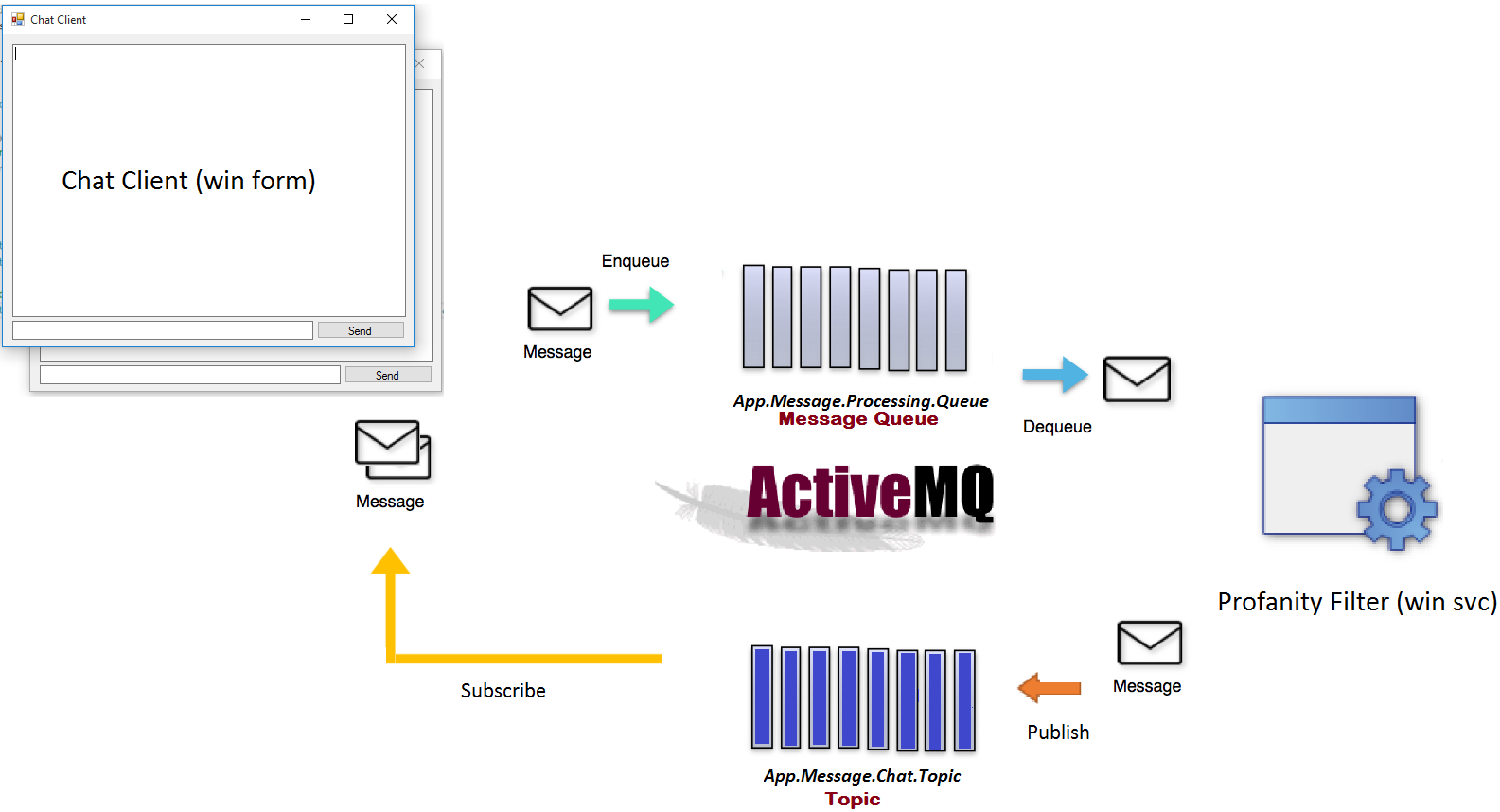
For the purpose of this tutorial you will be developing a simple chat client application as shown in the image below.
Application Overview
As shown in the diagram above, you will be developing a .NET solution (Tutorial.sln) with the following projects:
  • Tutorial.Chat.Ui
    • This project is a simple windows forms project which will server as the UI for the appliction.
    • The UI will accept uer inputs & send/enqueue them to a Queue ("App.Message.Processing.Queue") for being processed.
    • The UI will also be listening/subscrbing to a Topic ("App.Message.Chat.Topic") for processed messages.
  • Tutorial.ProfanityFilter.Svc
    • This project is a simple windows service applicaion which will be responsible for accepting messages from the UI and running them through a simple profanity filter.
    • The service will listen/dequeue messages from the aforementioned Queue ("App.Message.Processing.Queue") for processing messages.
    • The service will then send/publish processed messages to the aforementioned Topic ("App.Message.Chat.Topic") for being consumed by the UI.

Before you begin

Before you begin, you will need to install some prerequisites to get this working.
  • You will need JDK (You can google the relevant help doco).
    • Make sure post installation the JDK bin is added to your path.
    • You will also need to setup the "JAVA_HOME" path. I'm on a windows machine so mine is set to "C:\Program Files\Java\jdk1.8.0_91"
  • You will need to download the latest release of Active MQ available here.
  • To help you with the setup of ActiveMQ, you can lookup the help doco at http://activemq.apache.org/getting-started.html.

Start ActiveMQ

  1. You will need to navigate to the appropriate folder within the "bin" directory & run the activemq batch/script. In my case, its "apache-activemq-5.14.1-bin\apache-activemq-5.14.1\bin\win64\activemq.bat"
  2. On startup, the console should give you the different ports where activemq is listening. In my case it was:
    jvm 1 | INFO | Apache ActiveMQ 5.14.1 (localhost, ID:localhost-56683-1476933442897-0:1) is starting
    jvm 1 | INFO | Listening for connections at: tcp://localhost:61616?maximumConnections=1000&wireFormat.maxFrameSize=104857600
    jvm 1 | INFO | Connector openwire started
    jvm 1 | INFO | Listening for connections at: amqp://localhost:5672?maximumConnections=1000&wireFormat.maxFrameSize=104857600
    jvm 1 | INFO | Connector amqp started
    jvm 1 | INFO | Listening for connections at: stomp://localhost:61613?maximumConnections=1000&wireFormat.maxFrameSize=104857600
    jvm 1 | INFO | Connector stomp started
    jvm 1 | INFO | Listening for connections at: mqtt://localhost:1883?maximumConnections=1000&wireFormat.maxFrameSize=104857600
    jvm 1 | INFO | Connector mqtt started
    Additionally, the web console should be available at port 8161 based on the following log line:
    jvm 1 | INFO | ActiveMQ WebConsole available at http://localhost:8161/
    To test your installation, you can:
    • open the above link in a browser
    • Click "Manage ActiveMQ broker"
    • Enter the default username & password which is admin
    • Play around with the UI. This will help you better understand how to administer the message broker. Message Oriented Middleware

Tutorial Steps

The tutorial steps have been listed on the wiki page available at https://github.com/rohit-lakhanpal/apache-activemq-nms-tutorial/wiki/Tutorial

Tuesday, 19 April 2016

DEV MONTHLY #1: Coding Design Patterns

Coding Design Patterns


One of the most important aspects of writing maintainable code is being able to notice the recurring themes in that code and optimize them. This is an area where knowledge of design patterns can prove invaluable.

What is a Pattern you ask?


A pattern is a reusable solution that can be applied to commonly occurring problems in software design. The best part is, you might be using them without even knowing it!

Why would you use a well-known pattern?


  • Patterns are proven solutions and provide solid approaches to solving issues in software development 
  • Patterns can be easily reused as they can be adapted to suit our own needs
  • Patterns can be expressive as there’s generally a set structure and vocabulary to the solution


Patterns you must know (Language Agnostic)


Below, I am going to highlight some patterns that I love using & I think any good developer must know, but this in no way is a complete list. Be sure to share your fav patterns with others.

Note: I won’t be covering the MVC & MVVM patterns as they’re well documented at various different places.

Factory Pattern

Provides an interface for creating families of related or dependent objects without specifying their concrete classes.

For example lets discuss a scenario where the primary actors are:

  • Client
  • Factory
  • Product


The client is an object that requires an instance of another object (the product) for some purpose. Rather than creating the product instance directly, the client delegates this responsibility to the factory. Once invoked, the factory creates a new instance of the product, passing it back to the client. Put simply, the client uses the factory to create an instance of the product.

The factory completely abstracts the creation and initialization of the product from the client. This indirection enables the client to focus on its discrete role in the application without concerning itself with the details of how the product is created.

Sample code is available here: https://goo.gl/MTeCWS and https://goo.gl/YoQSW4

Builder Design Pattern

Separate the construction of a complex object from its representation so that the same construction process can create different representations. Parse a complex representation, create one of several targets.They address the problem where an application needs to create the elements of a complex aggregate. The specification for the aggregate exists on secondary storage and one of many representations needs to be built in primary storage.

Many times creational patterns (such as this one) are complementary: Builder can use the Abstract Factory to implement which components get built.

Sample code is available here: https://goo.gl/W2CmFX and https://goo.gl/NiRZ4r

Some Other Patterns worth researching
Repository Pattern: https://msdn.microsoft.com/en-us/library/ff649690.aspx
Service locator Pattern: https://msdn.microsoft.com/en-us/library/ff648968.aspx


JavasScript Specific Patterns

Module Pattern


Module pattern is used to further emulate the concept of classes in such a way that we're able to include both public/private methods and variables inside a single object, thus shielding particular parts from the global scope. What this results in is a reduction in the likelihood of our function names conflicting with other functions defined in additional scripts on the page.

The Module pattern encapsulates "privacy", state and organization using closures. It provides a way of wrapping a mix of public and private methods and variables, protecting pieces from leaking into the global scope and accidentally colliding with another developer's interface. With this pattern, only a public API is returned, keeping everything else within the closure private.

This gives us a clean solution for shielding logic doing the heavy lifting whilst only exposing an interface we wish other parts of our application to use. The pattern is quite similar to an immediately-invoked functional expression (IIFE[http://goo.gl/WF41CY] - see the section on namespacing patterns for more on this) except that an object is returned rather than a function.

Sample code: https://goo.gl/KiMXFk

The Revealing Module Pattern

The Revealing Module pattern is an extension of the module pattern requires us to define all of our functions and variables in the private scope and return an anonymous object with pointers to the private functionality we wished to reveal as public.
Sample code: https://goo.gl/d85I9n

Some more links ..

https://addyosmani.com/resources/essentialjsdesignpatterns/book/
https://msdn.microsoft.com/en-us/library/ms954638.aspx
http://programmers.stackexchange.com/questions/125822/how-important-are-design-patterns-in-programming
http://www.dofactory.com/net/design-patterns
https://sourcemaking.com/design_patterns/builder


http://www.dofactory.com/images/logo2.png
Data & Object Factory helps developers succeed with .NET Design Patterns through training, products, and a .NET Design Pattern and Practices community

http://cdn.sstatic.net/Sites/programmers/img/apple-touch-icon@2.png?v=8a6d048f3c78&a
programmers.stackexchange.com
I'm a university student and I've just started learning about design patterns and im struggling to understand the purpose of them. I have tried researching them but ...


msdn.microsoft.com
This paper starts with a brief review of SOA concepts and leads up to a detailed discussion of several patterns and anti-patterns that developers can leverage when ...


https://addyosmani.com/resources/essentialjsdesignpatterns/cover/cover.jpg
addyosmani.com
#JavaScript Design Patterns . In this section, we will explore JavaScript implementations of a number of both classic and modern design patterns.

Friday, 29 May 2015

Did you know appcmd commands

Did you know appcmd commands


Application Pools
1. Recycle all application pools (replace recycle with start/stop to start/stop all apppools)appcmd list apppool /xml | appcmd recycle apppool /in
2. Stop application pools with word "cheap" in it
appcmd list apppool /name:"$=*cheap*" /xml | appcmd stop apppool /in


3. Set property enable32BitAppOnWin64 to true for all apppools (Filter apppools as in 2 if needed)
appcmd list apppool /xml | appcmd set apppool /in /enable32BitAppOnWin64:true

4. Start apppools which are stopped
appcmd list apppool /state:Stopped /xml | appcmd start apppool /in

5. Recycle application pools which are used in some applications
appcmd list app /xml | appcmd list apppool /in /xml | appcmd recycle apppool /in
appcmd list app /xml | appcmd recycle apppool /in (This might recycle one apppool multiple times)

6. Recycle apppools serving website “Default Web Site”
appcmd list site "Default Web Site" /xml | appcmd list app /in /xml | appcmd list apppool /in /xml | appcmd recycle apppool /in
appcmd list app /site.name:"Default Web Site" /xml | appcmd list apppool /in /xml | appcmd recycle apppool /in


Sites
7. Start all the sites (Replace start with stop to stop all sites)
appcmd list site /xml | appcmd start site /in

8. Start the sites which are stopped
appcmd list site /state:stopped /xml | appcmd start site /in

9. Set serverAutoStart to false for all sites
appcmd list site /xml | appcmd set site /serverAutoStart:false /in

10. Keep sites config data and restore later
appcmd list site /config /xml > sites.xml
appcmd add sites /in < sites.xml


Applications and Vdirs
11. Delete all apps which are using a particular apppool
appcmd list apppool DefaultAppPool /xml | appcmd list app /in /xml | appcmd delete app /in

12. Move all applications in a site to NewAppPool apppool
appcmd list app /site.name:"Default Web Site" /xml | appcmd set app /in /applicationPool:NewAppPool

13. List all sites with "/test" app
appcmd list app /path:"/test" /xml | appcmd list site /in

14. List apps created by user10 (assuming all his apps under a folder whose name contains user10)
appcmd list vdir /physicalPath:"$=*user10*" /xml | appcmd list app /in

15. List sites which read from C:\inetput\wwwroot
appcmd list vdir /physicalPath:C:\inetput\wwwroot /xml | appcmd list app /xml /in | appcmd list site /in

16. List the vdirs of sites which are stopped
appcmd list site /state:stopped /xml | appcmd list app /xml /in | appcmd list vdir /in

Worker processes and Requests
17. Stop apppools of requests running for more than 60 seconds
appcmd list request /xml /time:"$>60000" | appcmd list apppool /in /xml | appcmd stop apppool /in

18. List apps served by wp 3600
appcmd list wp 3600 /xml | appcmd list apppool /xml /in | appcmd list app /in

Modules
19. Disable all managed modules
appcmd list module /preCondition:managedHandler /xml | appcmd delete module /in

20. Uninstall all native modules
appcmd list module /type:"" /xml | appcmd uninstall module /in

21. Unlock all module entries under system.webServer/modules (won’t work on vista)
appcmd list module /xml | appcmd set config /lockItem:false /in

Configuration
22. Keep config of a particular section and restore later
appcmd list config http://localhost/app1/ /section:caching /xml /config > config.xml
appcmd set config 
http://localhost/app1 /in < config.xml

Backups and Traces23. Delete all backups
appcmd list backup /xml | appcmd delete backup /in

24. List sites generating 404
appcmd list trace /statusCode:404 /xml | appcmd list site /in


References: This is a local copy of an article from http://goo.gl/fGvOYc

Monday, 4 May 2015

IIS Request Filtering to block HTTP Verbs (For example Trace)

The issue

Request Filtering is a built-in security feature that was introduced in Internet Information Services (IIS) 7.0. This can be used to block specific verbs like "Trace".

When request filtering blocks an HTTP request, IIS 7 will return an HTTP 404 error to the client and log the HTTP status with a unique substatus that identifies the reason that the request was denied. Verb Denied.

HTTP Substatus Description
404.5 URL Sequence Denied
404.6 Verb Denied
404.7 File Extension Denied
404.8 Hidden Namespace
404.1 Request Header Too Long
404.11 URL Double Escaped
404.12 URL Has High Bit Chars
404.13 Content Length Too Large
404.14 URL Too Long
404.15 Query String Too Long
404.18 Query String Sequence Denied
404.19 Denied by Filtering Rule

How to block

To block specific verbs, all you need to do is modify your web.config and under <system.webServer> à <security> add the following:
<requestFiltering>
    <verbs applyToWebDAV="false">
         <add verb="TRACE" allowed="false" />
    </verbs>
</requestFiltering>

OR

Step 1: Open IIS Manager
Step 2: Navigate to site & look for "Request Filtering"
Step 3: Navigate to HTTP Verbs & Deny TRACE

Verification of the issue (when bound to 443 over https)

Here we will attempt to check if the HTTP Trace method has been disabled on IIS.
  1. To complete this step you will need a machine with openssl. 
  2. You will need to log into the machine from step a using putty or an equivalent terminal. 
  3. Create a connection to the secure server via openssl using s_client 
    openssl s_client -connect dev.server.supportpoint.com:443 -servername dev.server.supportpoint.com -host dev.server.supportpoint.com -port 443
  4. Next mimic a TRACE connection

    by entering:
    TRACE /  HTTP/1.0
    Connection: dev.server.supportpoint.com 
  5. As you can notice here, the result returned is 404. 
  6. Check the IIS Access Logs for 404.6 (When request filtering blocks an HTTP request, IIS 7 will return an HTTP 404 error to the client and log the HTTP status with a unique substatus that identifies the reason that the request was denied. In our case, 404.6 is Verb Denied)
    1. Find the Application Id
      1. Go to the IIS Manager
      2. Right-click your site à Manage Website à Advanced Settings 
      3. Your ID is an integer value

    2. Navigate to logs directory & open last modified log file
      1. Go to %SystemDrive%\inetpub\logs\LogFiles
      2. Then find the folder based on your Application ID. 
        1. If your ID is 1, then go to W3SVC1. 
        2. If your ID is 2, then go to W3SVC2. 
        3. … and so on
      3. Open the Last Modifed Log file
    3. Search the log file for your TRACE request.
    4. You should now be able to see that the error logged is 404.6 

Wednesday, 14 January 2015

Part 2: Async requests in ASP.NET MVC 4 when working with Session [Thread Starvation my A$$]

This is a multi-part post dedicated to Async requests in ASP.NET MVC 4 when working with Session. Be sure to follow this series starting from the first post to gain a clear understanding.


Catch up from the last post

So in our last post it looked like it was Thread Starvation that was causing the all synchronous request to be queued and run sequentially. NOT! 

It wasn't Thread Starvation after all

So for thread starvation to occur, I should have exhaused all of the 5000 threads that were available. Seeing that I was hosting my application locally & was the only person accessing my website I couldn't have exhaused all my available threads (specified by MaxWorkerThreads). So we could deduce that it wasn't Thread Starvation.

What is it then?

Looks like i overlooked a key piece of information in my last post. The requests that were queuing up were all a part of the same session. 

How thread pools really work

On the Web server, the .NET Framework maintains a pool of threads that are used to service ASP.NET requests. When a request arrives, a thread from the pool is dispatched to process that request. If the request is processed synchronously, the thread that processes the request is blocked while the request is being processed, and that thread cannot service another request.

Access to ASP.NET session state is exclusive per session, which means that if two different users make concurrent requests, access to each separate session is granted concurrently. However, if two concurrent requests are made for the same session (by using the same SessionID value), the first request gets exclusive access to the session information. The second request executes only after the first request is finished. [Info Src Link]

What Microsoft recommends

The second session can also get access if the exclusive lock on the information is freed because the first request exceeds the lock time-out. If the EnableSessionState value in the @ Page directive is set to ReadOnly (or annotate the controller with [SessionState(SessionStateBehavior.ReadOnly)]), a request for the read-only session information does not result in an exclusive lock on the session data. However, read-only requests for session data might still have to wait for a lock set by a read-write request for session data to clear.

My solution

My original request method needed to get converted to an async operation achieved easily with async-await. In-spite of using async-await, the requests still ran sequentially due to the thread lock imposed by ASP.NET session state. Seeing that I needed access to my session state & possibly needed to save data to it, I couldn't simply disable the session state behavior. To find out what I ended up doing click here (Coming soon) (I'll include some code samples) ...

Sync v/s Async

Microsoft recommends the following ..
In general, use synchronous pipelines when the following conditions are true:
  • The operations are simple or short-running.
  • Simplicity is more important than efficiency.
  • The operations are primarily CPU operations instead of operations that involve extensive disk or network overhead. Using asynchronous action methods on CPU-bound operations provides no benefits and results in more overhead.
In general, use asynchronous pipelines when the following conditions are true:
  • The operations are network-bound or I/O-bound instead of CPU-bound.
  • Testing shows that the blocking operations are a bottleneck in site performance and that IIS can service more requests by using asynchronous action methods for these blocking calls.
  • Parallelism is more important than simplicity of code.
  • You want to provide a mechanism that lets users cancel a long-running request.