Thursday, 27 October 2016

Apache ActiveMQ with .NET Applications using Apache.NMS.ActiveMQ

The purpose of this repository is to help run a simple tutorial on how to integrate .NET applications with ApacheMQ using the NMS library.
If you'd like to follow the tutorial, please head to the wiki page & read the "Tutorial". Be sure to read the other pages before you commence the actual tutorial so that you understand important concepts.

Overview

Message Queues enable applications running at different times to communicate across heterogeneous networks and systems that may be temporarily offline. Applications send messages to queues and read messages from queues. The following illustration shows how a queue can hold messages that are generated by multiple sending applications and read by multiple receiving applications.
Message Oriented Middleware
Apache ActiveMQ ™ is one the most popular and powerful open source messaging and Integration Patterns server. Based on JMS, it allows an asynchronous communication mechanism in the distributed system field. It is fast, supports many Cross Language Clients and Protocols, comes with easy to use Enterprise Integration Patterns and many advanced features while fully supporting JMS 1.1 and J2EE 1.4. Also, it is released under the Apache 2.0 License.
ActiveMQ has a .NET Messaging API called NMS which is easily accessible via the nuget feed. The NMS API This allows you to build .NET applications in C#, VB, or any other .NET language, using a single API to connect to multiple different providers using a JMS style API.
The purpose of this repository is to help run a simple tutorial on how to integrate .NET applications with ApacheMQ using the NMS library.

Why use message queues

Message queues today form a vital component of most enterprise scale applications.
Here are some of the top reasons for using message queues. A more detailed explanation is available at the following link.
  • Decoupling
  • Redundancy
  • Scalability
  • Elasticity & Spikability
  • Resiliency
  • Delivery Guarantees
  • Asynchronous Communication
Before we begin, its important to understand a few basic concepts.

Basic Concepts

Characteristics of messaging services

  • Messages can be consumed sync or async
  • Consumers can filter which message they receive
  • Messages are placed in Destination in sent order
  • Message consumption order cannot be guaranteed

Message Models

  • Point-to-Point or P2P (Queuing Model)
  • Publisher-Subscriber or Pub-Sub (eg: Topic)

Queue

  • A JMS Queue implements load balancer semantics. A single message will be received by exactly one consumer.
  • If there are no consumers available at the time the message is sent it will be kept until a consumer is available that can process the message.
  • If a consumer receives a message and does not acknowledge it before closing then the message will be redelivered to another consumer. A queue can have many consumers with messages load balanced across the available consumers.
  • So Queues implement a reliable load balancer in JMS.
  • Can be thought of as a staging area that contains messages that have been sent and are waiting to be read.
  • Note that, contrary to what the name queue suggests, messages don't have to be delivered in the order sent. If the message driven bean pool contains more than one instance then messages can be processed concurrently and thus it is possible that a later message is processed sooner than an earlier one.
  • A JMS queue only guarantees that each message is processed only once.

Topic

  • A distribution mechanism for publishing messages that are delivered to multiple subscribers.
  • A good analogy for this is an anonymous bulletin board.
  • In JMS a Topic implements publish and subscribe semantics.
    • When you publish a message it goes to all the subscribers who are interested - so zero to many subscribers will receive a copy of the message.
    • Only subscribers who had an active subscription at the time the broker receives the message will get a copy of the message.

What we're trying to develop for the tutorial

For the purpose of this tutorial you will be developing a simple chat client application as shown in the image below.
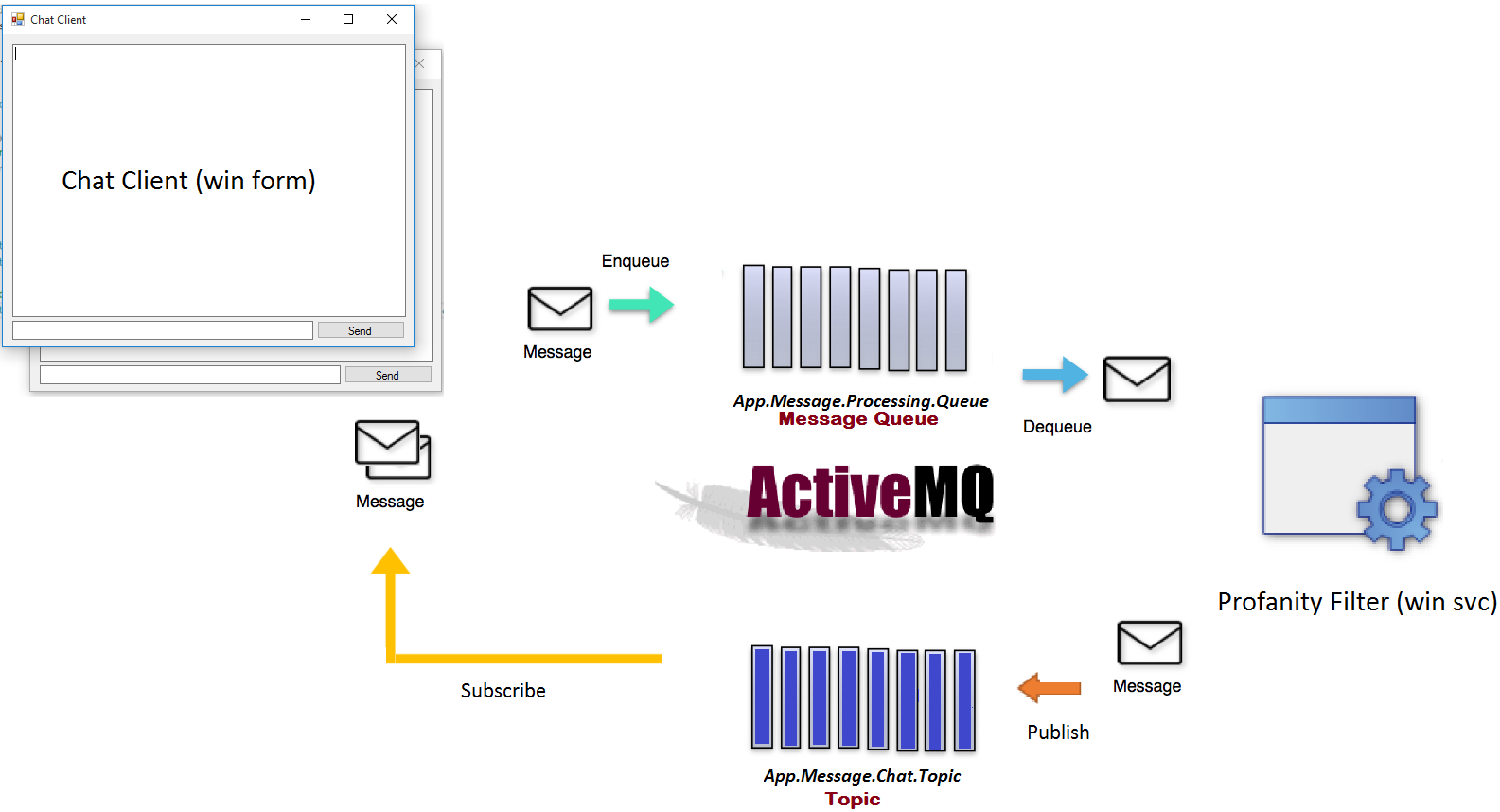
Application Overview
As shown in the diagram above, you will be developing a .NET solution (Tutorial.sln) with the following projects:
  • Tutorial.Chat.Ui
    • This project is a simple windows forms project which will server as the UI for the appliction.
    • The UI will accept uer inputs & send/enqueue them to a Queue ("App.Message.Processing.Queue") for being processed.
    • The UI will also be listening/subscrbing to a Topic ("App.Message.Chat.Topic") for processed messages.
  • Tutorial.ProfanityFilter.Svc
    • This project is a simple windows service applicaion which will be responsible for accepting messages from the UI and running them through a simple profanity filter.
    • The service will listen/dequeue messages from the aforementioned Queue ("App.Message.Processing.Queue") for processing messages.
    • The service will then send/publish processed messages to the aforementioned Topic ("App.Message.Chat.Topic") for being consumed by the UI.

Before you begin

Before you begin, you will need to install some prerequisites to get this working.
  • You will need JDK (You can google the relevant help doco).
    • Make sure post installation the JDK bin is added to your path.
    • You will also need to setup the "JAVA_HOME" path. I'm on a windows machine so mine is set to "C:\Program Files\Java\jdk1.8.0_91"
  • You will need to download the latest release of Active MQ available here.
  • To help you with the setup of ActiveMQ, you can lookup the help doco at http://activemq.apache.org/getting-started.html.

Start ActiveMQ

  1. You will need to navigate to the appropriate folder within the "bin" directory & run the activemq batch/script. In my case, its "apache-activemq-5.14.1-bin\apache-activemq-5.14.1\bin\win64\activemq.bat"
  2. On startup, the console should give you the different ports where activemq is listening. In my case it was:
    jvm 1 | INFO | Apache ActiveMQ 5.14.1 (localhost, ID:localhost-56683-1476933442897-0:1) is starting
    jvm 1 | INFO | Listening for connections at: tcp://localhost:61616?maximumConnections=1000&wireFormat.maxFrameSize=104857600
    jvm 1 | INFO | Connector openwire started
    jvm 1 | INFO | Listening for connections at: amqp://localhost:5672?maximumConnections=1000&wireFormat.maxFrameSize=104857600
    jvm 1 | INFO | Connector amqp started
    jvm 1 | INFO | Listening for connections at: stomp://localhost:61613?maximumConnections=1000&wireFormat.maxFrameSize=104857600
    jvm 1 | INFO | Connector stomp started
    jvm 1 | INFO | Listening for connections at: mqtt://localhost:1883?maximumConnections=1000&wireFormat.maxFrameSize=104857600
    jvm 1 | INFO | Connector mqtt started
    Additionally, the web console should be available at port 8161 based on the following log line:
    jvm 1 | INFO | ActiveMQ WebConsole available at http://localhost:8161/
    To test your installation, you can:
    • open the above link in a browser
    • Click "Manage ActiveMQ broker"
    • Enter the default username & password which is admin
    • Play around with the UI. This will help you better understand how to administer the message broker. Message Oriented Middleware

Tutorial Steps

The tutorial steps have been listed on the wiki page available at https://github.com/rohit-lakhanpal/apache-activemq-nms-tutorial/wiki/Tutorial

Tuesday, 19 April 2016

DEV MONTHLY #1: Coding Design Patterns

Coding Design Patterns


One of the most important aspects of writing maintainable code is being able to notice the recurring themes in that code and optimize them. This is an area where knowledge of design patterns can prove invaluable.

What is a Pattern you ask?


A pattern is a reusable solution that can be applied to commonly occurring problems in software design. The best part is, you might be using them without even knowing it!

Why would you use a well-known pattern?


  • Patterns are proven solutions and provide solid approaches to solving issues in software development 
  • Patterns can be easily reused as they can be adapted to suit our own needs
  • Patterns can be expressive as there’s generally a set structure and vocabulary to the solution


Patterns you must know (Language Agnostic)


Below, I am going to highlight some patterns that I love using & I think any good developer must know, but this in no way is a complete list. Be sure to share your fav patterns with others.

Note: I won’t be covering the MVC & MVVM patterns as they’re well documented at various different places.

Factory Pattern

Provides an interface for creating families of related or dependent objects without specifying their concrete classes.

For example lets discuss a scenario where the primary actors are:

  • Client
  • Factory
  • Product


The client is an object that requires an instance of another object (the product) for some purpose. Rather than creating the product instance directly, the client delegates this responsibility to the factory. Once invoked, the factory creates a new instance of the product, passing it back to the client. Put simply, the client uses the factory to create an instance of the product.

The factory completely abstracts the creation and initialization of the product from the client. This indirection enables the client to focus on its discrete role in the application without concerning itself with the details of how the product is created.

Sample code is available here: https://goo.gl/MTeCWS and https://goo.gl/YoQSW4

Builder Design Pattern

Separate the construction of a complex object from its representation so that the same construction process can create different representations. Parse a complex representation, create one of several targets.They address the problem where an application needs to create the elements of a complex aggregate. The specification for the aggregate exists on secondary storage and one of many representations needs to be built in primary storage.

Many times creational patterns (such as this one) are complementary: Builder can use the Abstract Factory to implement which components get built.

Sample code is available here: https://goo.gl/W2CmFX and https://goo.gl/NiRZ4r

Some Other Patterns worth researching
Repository Pattern: https://msdn.microsoft.com/en-us/library/ff649690.aspx
Service locator Pattern: https://msdn.microsoft.com/en-us/library/ff648968.aspx


JavasScript Specific Patterns

Module Pattern


Module pattern is used to further emulate the concept of classes in such a way that we're able to include both public/private methods and variables inside a single object, thus shielding particular parts from the global scope. What this results in is a reduction in the likelihood of our function names conflicting with other functions defined in additional scripts on the page.

The Module pattern encapsulates "privacy", state and organization using closures. It provides a way of wrapping a mix of public and private methods and variables, protecting pieces from leaking into the global scope and accidentally colliding with another developer's interface. With this pattern, only a public API is returned, keeping everything else within the closure private.

This gives us a clean solution for shielding logic doing the heavy lifting whilst only exposing an interface we wish other parts of our application to use. The pattern is quite similar to an immediately-invoked functional expression (IIFE[http://goo.gl/WF41CY] - see the section on namespacing patterns for more on this) except that an object is returned rather than a function.

Sample code: https://goo.gl/KiMXFk

The Revealing Module Pattern

The Revealing Module pattern is an extension of the module pattern requires us to define all of our functions and variables in the private scope and return an anonymous object with pointers to the private functionality we wished to reveal as public.
Sample code: https://goo.gl/d85I9n

Some more links ..

https://addyosmani.com/resources/essentialjsdesignpatterns/book/
https://msdn.microsoft.com/en-us/library/ms954638.aspx
http://programmers.stackexchange.com/questions/125822/how-important-are-design-patterns-in-programming
http://www.dofactory.com/net/design-patterns
https://sourcemaking.com/design_patterns/builder


http://www.dofactory.com/images/logo2.png
Data & Object Factory helps developers succeed with .NET Design Patterns through training, products, and a .NET Design Pattern and Practices community

http://cdn.sstatic.net/Sites/programmers/img/apple-touch-icon@2.png?v=8a6d048f3c78&a
programmers.stackexchange.com
I'm a university student and I've just started learning about design patterns and im struggling to understand the purpose of them. I have tried researching them but ...


msdn.microsoft.com
This paper starts with a brief review of SOA concepts and leads up to a detailed discussion of several patterns and anti-patterns that developers can leverage when ...


https://addyosmani.com/resources/essentialjsdesignpatterns/cover/cover.jpg
addyosmani.com
#JavaScript Design Patterns . In this section, we will explore JavaScript implementations of a number of both classic and modern design patterns.

Friday, 29 May 2015

Did you know appcmd commands

Did you know appcmd commands


Application Pools
1. Recycle all application pools (replace recycle with start/stop to start/stop all apppools)appcmd list apppool /xml | appcmd recycle apppool /in
2. Stop application pools with word "cheap" in it
appcmd list apppool /name:"$=*cheap*" /xml | appcmd stop apppool /in


3. Set property enable32BitAppOnWin64 to true for all apppools (Filter apppools as in 2 if needed)
appcmd list apppool /xml | appcmd set apppool /in /enable32BitAppOnWin64:true

4. Start apppools which are stopped
appcmd list apppool /state:Stopped /xml | appcmd start apppool /in

5. Recycle application pools which are used in some applications
appcmd list app /xml | appcmd list apppool /in /xml | appcmd recycle apppool /in
appcmd list app /xml | appcmd recycle apppool /in (This might recycle one apppool multiple times)

6. Recycle apppools serving website “Default Web Site”
appcmd list site "Default Web Site" /xml | appcmd list app /in /xml | appcmd list apppool /in /xml | appcmd recycle apppool /in
appcmd list app /site.name:"Default Web Site" /xml | appcmd list apppool /in /xml | appcmd recycle apppool /in


Sites
7. Start all the sites (Replace start with stop to stop all sites)
appcmd list site /xml | appcmd start site /in

8. Start the sites which are stopped
appcmd list site /state:stopped /xml | appcmd start site /in

9. Set serverAutoStart to false for all sites
appcmd list site /xml | appcmd set site /serverAutoStart:false /in

10. Keep sites config data and restore later
appcmd list site /config /xml > sites.xml
appcmd add sites /in < sites.xml


Applications and Vdirs
11. Delete all apps which are using a particular apppool
appcmd list apppool DefaultAppPool /xml | appcmd list app /in /xml | appcmd delete app /in

12. Move all applications in a site to NewAppPool apppool
appcmd list app /site.name:"Default Web Site" /xml | appcmd set app /in /applicationPool:NewAppPool

13. List all sites with "/test" app
appcmd list app /path:"/test" /xml | appcmd list site /in

14. List apps created by user10 (assuming all his apps under a folder whose name contains user10)
appcmd list vdir /physicalPath:"$=*user10*" /xml | appcmd list app /in

15. List sites which read from C:\inetput\wwwroot
appcmd list vdir /physicalPath:C:\inetput\wwwroot /xml | appcmd list app /xml /in | appcmd list site /in

16. List the vdirs of sites which are stopped
appcmd list site /state:stopped /xml | appcmd list app /xml /in | appcmd list vdir /in

Worker processes and Requests
17. Stop apppools of requests running for more than 60 seconds
appcmd list request /xml /time:"$>60000" | appcmd list apppool /in /xml | appcmd stop apppool /in

18. List apps served by wp 3600
appcmd list wp 3600 /xml | appcmd list apppool /xml /in | appcmd list app /in

Modules
19. Disable all managed modules
appcmd list module /preCondition:managedHandler /xml | appcmd delete module /in

20. Uninstall all native modules
appcmd list module /type:"" /xml | appcmd uninstall module /in

21. Unlock all module entries under system.webServer/modules (won’t work on vista)
appcmd list module /xml | appcmd set config /lockItem:false /in

Configuration
22. Keep config of a particular section and restore later
appcmd list config http://localhost/app1/ /section:caching /xml /config > config.xml
appcmd set config 
http://localhost/app1 /in < config.xml

Backups and Traces23. Delete all backups
appcmd list backup /xml | appcmd delete backup /in

24. List sites generating 404
appcmd list trace /statusCode:404 /xml | appcmd list site /in


References: This is a local copy of an article from http://goo.gl/fGvOYc

Monday, 4 May 2015

IIS Request Filtering to block HTTP Verbs (For example Trace)

The issue

Request Filtering is a built-in security feature that was introduced in Internet Information Services (IIS) 7.0. This can be used to block specific verbs like "Trace".

When request filtering blocks an HTTP request, IIS 7 will return an HTTP 404 error to the client and log the HTTP status with a unique substatus that identifies the reason that the request was denied. Verb Denied.

HTTP Substatus Description
404.5 URL Sequence Denied
404.6 Verb Denied
404.7 File Extension Denied
404.8 Hidden Namespace
404.1 Request Header Too Long
404.11 URL Double Escaped
404.12 URL Has High Bit Chars
404.13 Content Length Too Large
404.14 URL Too Long
404.15 Query String Too Long
404.18 Query String Sequence Denied
404.19 Denied by Filtering Rule

How to block

To block specific verbs, all you need to do is modify your web.config and under <system.webServer> Ã  <security> add the following:
<requestFiltering>
    <verbs applyToWebDAV="false">
         <add verb="TRACE" allowed="false" />
    </verbs>
</requestFiltering>

OR

Step 1: Open IIS Manager
Step 2: Navigate to site & look for "Request Filtering"
Step 3: Navigate to HTTP Verbs & Deny TRACE

Verification of the issue (when bound to 443 over https)

Here we will attempt to check if the HTTP Trace method has been disabled on IIS.
  1. To complete this step you will need a machine with openssl. 
  2. You will need to log into the machine from step a using putty or an equivalent terminal. 
  3. Create a connection to the secure server via openssl using s_client 
    openssl s_client -connect dev.server.supportpoint.com:443 -servername dev.server.supportpoint.com -host dev.server.supportpoint.com -port 443
  4. Next mimic a TRACE connection

    by entering:
    TRACE /  HTTP/1.0
    Connection: dev.server.supportpoint.com 
  5. As you can notice here, the result returned is 404. 
  6. Check the IIS Access Logs for 404.6 (When request filtering blocks an HTTP request, IIS 7 will return an HTTP 404 error to the client and log the HTTP status with a unique substatus that identifies the reason that the request was denied. In our case, 404.6 is Verb Denied)
    1. Find the Application Id
      1. Go to the IIS Manager
      2. Right-click your site Ã  Manage Website Ã  Advanced Settings 
      3. Your ID is an integer value

    2. Navigate to logs directory & open last modified log file
      1. Go to %SystemDrive%\inetpub\logs\LogFiles
      2. Then find the folder based on your Application ID. 
        1. If your ID is 1, then go to W3SVC1. 
        2. If your ID is 2, then go to W3SVC2. 
        3. … and so on
      3. Open the Last Modifed Log file
    3. Search the log file for your TRACE request.
    4. You should now be able to see that the error logged is 404.6 

Wednesday, 14 January 2015

Part 2: Async requests in ASP.NET MVC 4 when working with Session [Thread Starvation my A$$]

This is a multi-part post dedicated to Async requests in ASP.NET MVC 4 when working with Session. Be sure to follow this series starting from the first post to gain a clear understanding.


Catch up from the last post

So in our last post it looked like it was Thread Starvation that was causing the all synchronous request to be queued and run sequentially. NOT! 

It wasn't Thread Starvation after all

So for thread starvation to occur, I should have exhaused all of the 5000 threads that were available. Seeing that I was hosting my application locally & was the only person accessing my website I couldn't have exhaused all my available threads (specified by MaxWorkerThreads). So we could deduce that it wasn't Thread Starvation.

What is it then?

Looks like i overlooked a key piece of information in my last post. The requests that were queuing up were all a part of the same session. 

How thread pools really work

On the Web server, the .NET Framework maintains a pool of threads that are used to service ASP.NET requests. When a request arrives, a thread from the pool is dispatched to process that request. If the request is processed synchronously, the thread that processes the request is blocked while the request is being processed, and that thread cannot service another request.

Access to ASP.NET session state is exclusive per session, which means that if two different users make concurrent requests, access to each separate session is granted concurrently. However, if two concurrent requests are made for the same session (by using the same SessionID value), the first request gets exclusive access to the session information. The second request executes only after the first request is finished. [Info Src Link]

What Microsoft recommends

The second session can also get access if the exclusive lock on the information is freed because the first request exceeds the lock time-out. If the EnableSessionState value in the @ Page directive is set to ReadOnly (or annotate the controller with [SessionState(SessionStateBehavior.ReadOnly)]), a request for the read-only session information does not result in an exclusive lock on the session data. However, read-only requests for session data might still have to wait for a lock set by a read-write request for session data to clear.

My solution

My original request method needed to get converted to an async operation achieved easily with async-await. In-spite of using async-await, the requests still ran sequentially due to the thread lock imposed by ASP.NET session state. Seeing that I needed access to my session state & possibly needed to save data to it, I couldn't simply disable the session state behavior. To find out what I ended up doing click here (Coming soon) (I'll include some code samples) ...

Sync v/s Async

Microsoft recommends the following ..
In general, use synchronous pipelines when the following conditions are true:
  • The operations are simple or short-running.
  • Simplicity is more important than efficiency.
  • The operations are primarily CPU operations instead of operations that involve extensive disk or network overhead. Using asynchronous action methods on CPU-bound operations provides no benefits and results in more overhead.
In general, use asynchronous pipelines when the following conditions are true:
  • The operations are network-bound or I/O-bound instead of CPU-bound.
  • Testing shows that the blocking operations are a bottleneck in site performance and that IIS can service more requests by using asynchronous action methods for these blocking calls.
  • Parallelism is more important than simplicity of code.
  • You want to provide a mechanism that lets users cancel a long-running request.

Saturday, 27 December 2014

Part 1: Async requests in ASP.NET MVC 4 when working with Session [Understanding the problem]

This is a multi-part post dedicated to Async requests in ASP.NET MVC 4 when working with Session. Be sure to follow this series starting from the first post to gain a clear understanding.


Our Objective

A part of the application that we're developing at Panviva required us to download an xml file generated by our legacy system via a web service call to the existing application server. While the task at hand was was easy to accomplish, I noticed that the time it took to generate the file could take a few minutes. Additionally it blocked the user from making any other requests while it processed. I know, YIKES!!

Of course its not acceptable cause while that request responded, the user in that session could pretty much do nothing else.

How web servers respond

Its important to understand how the web server responds to requests.

On the web server, the .NET Framework maintains a pool of threads that are used to service ASP.NET requests. When a request arrives, a thread from the pool is dispatched to process that request. If the request is processed synchronously, the thread that processes the request is busy while the request is being processed, and that thread cannot service another request.

This might not be a problem, because the thread pool can be made large enough to accommodate many busy threads. However, the number of threads in the thread pool is limited (the default maximum for .NET 4.5 is 5,000). In large applications with high concurrency of  long-running requests, all available threads might be busy. This condition is known as thread starvation. When this condition is reached, the web server queues requests. [Info Src Link]


The problem

So looks like it was Thread Starvation that was causing the issue ... OR WAS IT?? *Insert Dramatic Pause*

Find out more in my next post here! (Spoiler Alert: Turns out it wasn't Thread Starvation)

Wednesday, 15 October 2014

State Management in ASP.NET

This material is referenced from (http://www.codeproject.com/Articles/180726/State-management-and-ways-to-handle-Cache-in-a-Web). 

Introduction

In this article, I am going to talk about state management but focus mainly on Web Farm and Web Garden scenarios as there are already very good articles available on the topic in CodeProject. Also, I have already written a few articles on state management. Just for the new readers, I am adding the first few sections from my earlier article to give a brief idea about state management. In this article, I'll be discussing about Web Farms/Web Gardens and later will discuss the various approaches to handle cache in a Web Farm/Web Garden scenario.

Basics about state management

As we all know, the web is stateless. A web page is recreated every time it is posted back to the server. In traditional web programming, all the information within a page and controls get wiped off on every postback. To overcome this problem, the ASP.NET framework provides various ways to preserve the states at various stages, like controlstate, viewstate, cookies, session, etc. These can be defined at the client side and server side state management. Please see the image below.
State Management in ASP.NET
Various options maintain the state
In this article, I will be talking about server side state management techniques. First, let's talk about a very basic and key thing, AppDomain, which was introduced in .NET 2.0,

What is AppDomain

An AppDomain can be defined as a light weight process used for security isolation and availability. The AppDomain is hosted on some process and a process can host multiple AppDomains. So one Appdomain can go down/restart without affecting other AppDomains in the same process.

Role of AppDomain in ASP.NET

AppDomain plays a key role in ASP.NET. When ASP.NET receives the first request, the application manager creates an application domain for it. Application domains are very important because they provide the isolation among various applications on a web server, and every application domain is loaded and unloaded separately, and in an application domain an instance of the class HostingEnvironment is created which provides access to information about all the application resources. Here is a pictorial view:
ASP.NET page processing
ASP.NET handling the first request
The AppDomain is responsible for all the server side side management, which means all the data session (InProc mode), application objects/variable cache, all resides in the AppDomain itself. If the AppDomain goes down, all the data in the webserver will be wiped off. Let's have a view:
AppDomaincontains.PNG
All server side state management data resides in the AppDomain
Let's now talk about Web Farm and Web Garden.

What is a Web Farm

A Web Farm is used in highly available applications and which have a lot of users that cannot be served by a single server. They provides better performance and are easily scalable. It means we'll have multiple web servers behind a Network Load Balancer(NLB). Whenever a request comes, it first goes to the load balancer, which checks all the available web servers and finds the web server which has comparatively less requests to serve, and passes the request to that web server. Let's have a pictorial overview.
Web Farm
A Web Farm
Most of the large applications are deployed in a Web Farm scenario. A single server might not able to handle millions of requests in a day, and we provide a virtual IP to the Load Balancer, and the URL is mapped to the Load Balancer; the load balancer takes the decision to pass the request to a specific web server.
In this scenario, the session mode InProc does not work. We need to use the OutProc mode, because if the first request is served by server1 and its stores session data, but later for another request the Load Balancer finds that server1 is busy handling other requests, it can pass the request to another server, which obviously will not have the session data and this can result in a bizarre output.
In OutProc mode, session data is not stored in the AppDomain of the web server. We store the data in another server. We'll discuss it later.

Affinity

There is a setting known as affinity parameter setting, which can be set so that the Load Balancer directs all the requests from one client IP address to the same machine. This allows us to use Session (InProc mode), Application data, and Cache in a Web Farm scenario seamlessly. This means the application would work like it is deployed on a single server. But this has a few limitations like:
  • If the server serving the request goes down in between, all the server data would be lost.
  • This limits the use of a Web Farm as a Load alancer would be confined to redirecting requests for the same client machines to a single web server only.
Have detailed look on the link Click here

What is a Web Garden

When we deploy our application on IIS (6 and above), we assign an application pool to our application. An application pool is used for isolation purposes from other applications deployed on the same web server. An application pool has one worker process (w3wp.exe) normally. An AppDomain is created over this worker process that handles/serves the requests sent by the client machines. All the server data (Session, Cache, Static variables, Application variables) are stored in the AppDomain boundary. But we can have multiple worker processes on the same application pool for performance benefits. This allows better handling for web requests sent by the client machines. But these worker processes do not share the memory and a new AppDomain is created for the same application and each AppDomain will have its own copy of data. This means if some session is stored in an AppDoain's memory and the next request is handled by another web server, it won't have the previously stored session data.
Let's have a pictorial overview.
Application pools
First two application pools show a Web Garden scenario
A Web Garden provides performance benefits in multi-core processor systems taking benefits from other CPUs.

Affinity

Now the question: Do we have some affinity settings in a Web Garden scenario? Yes.
There is a hard-coded client connection affinity to a worker process instance. So for a given client TCP connection, all the HTTP requests will be handled by the same instance of the worker process.
So as we all have seen, in the case of setting the affinity parameter, we can host our application in a Web Farm/Web Garden scenario without worrying about how the web server data is going to be stored and managed. It will work seamlessly as our application is hosted on a single server.
As we discussed the limitations of the affinity parameter, it is understood that it is not advisable to set the affinity parameter.

More about session management

Let's discuss Session a bit. As we know, Session is stored on the web server. First, let's have a quick look at how Session is stored.
There are two modes for storing Session:
  • InProc
  • OutProc
InProc: In this mode, Session values are stored in the AppDomain on the Web server where the application is running. As this is stored in the server memory, it's highly efficient from a performance point of view. But this is not very scalable and robust, because a the users for the application increase, your application may face a tough time processing multiple requests and it can go down. And also for websites that require high availability, this does not work.
OutProc: The data in the Session is not stored in the AppDomain in the Web server memory. And whenever your data goes out from the Web server memory, you need to serialize and deserialize again before using it. There is performance overhead in this as well. The Session is stored in three ways:
  • StateServer: Session information is in a state server in a process known as the ASP.NET state service, that is separate from the ASP.NET worker process. This is a single point of failure. If this service/box goes down, your application will stop working abruptly.
  • SQL Server: We store the session in SQL Server. .NET provides some default scripts that can be used to install the SQL Server and it gets ready to use to store session data. Also, we can have a cluster by maintaining the Session on several machines. So if one goes down, the user requests can be served from another box.
  • Custom aproach: ASP.NET provides us the flexibility to write our own custom provider for maintaining and storing Session data. This allows us to store session data where and how we want.
We have already discussed a lot on these. What about other state management methods like Cache, Application State, static variables? Can we use the Application state in the case of a Web Farm/Web Garden scenario? I have found people not having much ideas about other state management techniques like Application and Cache.
Let's now discuss Cache.

How to handle Cache in a Web Farm/Web Garden scenario

To start with, you must have some basic idea about Cache management in ASP.NET. You can go to the following link which gives you a very good idea about cache management: Exploring Caching in ASP.NET.
How can we handle Cache which resides in the AppDomain in a Web Farm or Web Garden scenario? The best way is to not use Cache in a Web Farm or Web Garden scenario. It all depends on the requirements, and the kind of data you are going to have in your Cache.
If you have really static data, like country names, it is not going to be changed every now and again. In such a case, it does not matter whether it is in a Web Farm/Web Garden scenario. If the data is not available in the AppDomain, it will get loaded from the database. And obviously, it's not going to change once it is loaded and so no more worries.
Now I will discuss some specific scenarios:

Scenario 1

You have some data in a file system. You have lots of data in your config file which is frequently used. Reading repeatedly from the config file would not be a good approach. It's better to have it in the Cache and retrieve it from there whenever required.

Approach

This is a very basic scenario: you can load the data initially when there is no data in the Cache and set the dependency on the file. This means whenever there is a change in a file, the cache will be invalidated and will get updated, and this will be valid for all AppDomains across the Web Farm/Web Garden.
Dependency on File System
Cache with dependency on a file

Scenario 2

Let's say we have some master data that is used by the entire application frequently. It might not be a good approach to get the data the database every time you need it. It's better to have it in the Cache. One more thing, this master can be updated by the Admin with an interface.

Approach

I think this is a very basic requirement and the best candidate for using Cache. The data is almost static and will be updated very infrequently. There is some master data which we can load the first time when it is not in the cache. Their can an admin interface which alone can enter the master and update it in the database. At this point, one need to update the Cache for all the AppDomains on all the web servers. In a Web Farm scenario, your data is coming from database, and you can set the dependency on the database so that as soon as the data gets updated in your database, the cache will be invalidated on all the web servers and will get reloaded with the updated data from database. This is a common scenario and you need not worry about data syncing. Here is a pictorial view.
dbdependency.PNG
Cache with dependency on database

Scenario 3

This is a common scenario: we store some data in the Cache in the server and it get updated at any time. How do we handle this in a Web Farm or Web Garden scenario?

Approach 1

As soon as the data in any of the cache gets updated, it will invoke a Web Service call to all the web servers which will update the cache in all the associated web servers behind the Load Balancer. So here we can have a table in the database which will have the IP of the web server connected in the Web Farm (the IPs will be the direct IPs of the web servers not the load balancer virtual IP). Let's see this in steps.
  • There will a table in the database with the IPs of all the webservers under the load balancer.
  • There will be a Web Service that will get the IPs of all the webservers and update the cache.
  • The Web Service will be invoked by any of the webservers behind the load balancer on which the cache will get updated.
It is also a good idea to add a new webserver under the load balancer to cater to the new needs. Just add the table which has all the IPs of the webservers.
Cache handling with web service approach
Cache handling with the Web Service approach in a Web Farm scenario

Approach 2

In this case, your cache is not on the web server but you can store it on some other server. Every web server is going to connect to this machine to get the cached data. You might ask, if the cache is stored on another box, what will be the performance cost? I would suggest you to have a Remoting (TCP) connection to that caching server and it will be very fast to get data from there, that there would not be much difference in having the data in the same web server's memory or in a cache server.
Remoting Approach
Cache handling with Remoting approach in a Web Farm scenario

Approach 3

This is a very easy one and will cost you money. There are myriad third party tools available which can be used to handle the cache issue on a Web Farm or Web Garden scenario. You can find them with the help of Google.


Also look at http://dotnetcodr.com/2013/07/01/web-farms-in-net-and-iis-part-5-session-state-management/