Tuesday, 18 March 2014

jQuery Attribute Wildcard Selectors

You most likely already know it but I thought I'd highlight some common wildcard selector patters that can be used in jQuery .. I've added a jsFiddle here (http://jsfiddle.net/roeburg/mkTvx/) ..

Attribute Contains Prefix Selector [name|="value"]

Selects elements that have the specified attribute with a value either equal to a given string or starting with that string followed by a hyphen (-). (jQuery Api Link :  http://api.jquery.com/attribute-contains-prefix-selector/)


Attribute Contains Selector [name*="value"]

This is the most generous of the jQuery attribute selectors that match against a value. It will select an element if the selector's string appears anywhere within the element's attribute value. Compare this selector with the Attribute Contains Word selector (e.g. [attr~="word"]), which is more appropriate in many cases. (Jquery Api Link: http://api.jquery.com/attribute-contains-selector/)


Attribute Ends With Selector [name$="value"]

Selects elements that have the specified attribute with a value ending exactly with a given string. The comparison is case sensitive. (jQuery Api Link: http://api.jquery.com/attribute-ends-with-selector/)


Attribute Contains Word Selector [name~="value"]

Selects elements that have the specified attribute with a value containing a given word, delimited by spaces. This selector matches the test string against each word in the attribute value, where a "word" is defined as a string delimited by whitespace. The selector matches if the test string is exactly equal to any of the words. (jQuery Api Link: http://api.jquery.com/attribute-contains-word-selector/)


There are of course others ..

Sunday, 2 February 2014

JavaScript Did You Know? #Ramblings


I've been told on more than one occasion that I tend to ramble. But then again who doesn't from time to time ey? What I meant to ramble on about were some interesting JavaScript constructs, patterns, code .. etc

Self Executing Anonymous Functions and Document.Ready

While they can be really helpful, its always important to understand how and when they get executed. In case you'd like to know more about Self Executing Anonymous functions, here's a post by Mark Dalgleish  http://markdalgleish.com/2011/03/self-executing-anonymous-functions/

<div class="before">
    Before Div. This content will change!
</div>
<script>
    (function () {
        $(".before").html("Since the div is declared before the script block, its loaded and we're able to manipulate it.");
        $(".after").html("The div declared after the script block is not yet loaded, we're not able to do anything!");
    })()
</script>
<div class="after">
    After Div. This content will not change.
</div>

As you may expect, the HTML elements declared before the script block will be loaded. The elements declared after the script block would not have been loaded and hence unavailable for any manipulation. (JsFiddle Link: http://jsfiddle.net/roeburg/j2r4U/ ). This behaviour is quite different from document.ready where the code is executed only when all the dom elements have been loaded! (Jsfiddle Link: http://jsfiddle.net/roeburg/Cy62T/2/)

Comparison Operators == and === 

JavaScript has both strict and Type–converting (abstract) comparisons.A strict comparison (e.g., ===) is only true if the operands are the same Type. The more commonly used abstract comparison (e.g., ==) converts the operands to the same Type before making the comparison. For relational abstract comparisons (e.g., <=), the operands are first converted to primitives, then the same Type, before comparison. (More Examples: http://goo.gl/vqJ8ek)

Arithmetic Operations on Strings V/s Numbers

<div>"1" + 2 + 3 = <span class="answer1"></span></div>

<div>1 + "2" + 3 = <span class="answer2"></span></div>

<div>1 + 2 + "3" = <span class="answer3"></span></div>

<div>1 + 2 + 3 = <span class="answer4"></span> </div>

<script>
$(function () {
    var ans1 = "1" + 2 + 3;
    $(".answer1").html(ans1);
    
    var ans2 = 1 + "2" + 3;
    $(".answer2").html(ans2);
    
    var ans3 = 1 + 2 + "3";
    $(".answer3").html(ans3);
    
    var ans4 = 1 + 2 + 3;
    $(".answer4").html(ans4);
})
</script>

(JsFiddle Link: http://jsfiddle.net/roeburg/N5RhP/1/)

JavaScript Scoping and Hoisting

JavaScript has two scopes: global and local. A variable that is declared outside a function definition is a global variable, and its value is accessible and modifiable throughout your program. A variable that is declared inside a function definition is local. It is created and destroyed every time the function is executed, and it cannot be accessed by any code outside the function. JavaScript does not support block scope (in which a set of braces {. . .} defines a new scope), except in the special case of block-scoped variables. (JsFiddle Link: http://jsfiddle.net/roeburg/pp9Pv/)

$(function () {
    // Global definition of aCentaur.
    var aCentaur = "a horse with rider,";

    // A local aCentaur variable is declared in this function.
    function antiquities() {

        var aCentaur = "A centaur is probably a mounted Scythian warrior";
    }

    antiquities();
    aCentaur += " as seen from a distance by a naive innocent.";

    $("div").html(aCentaur);

    // Output: "a horse with rider, as seen from a distance by a naive innocent."
})

In JavaScript function declarations and variable declarations are 'hoisted' i.e. are silently moved to the very top of the scope.

(JsFiddle Link: http://jsfiddle.net/roeburg/vNhLp/)


Tuesday, 8 October 2013

Validating Anti-Forgery Tokens over AJAX using MVC 4


In ASP.NET MVC, the HtmlHelper.AntiForgeryToken Method generates a hidden form field (anti-forgery token) that is validated when the form is submitted.

This method is essential in preventing Cross-Site Request Forgery (CSRF) attacks by using the @Html.AntiForgeryToken() helper.

What is Cross-Site Request Forgery you ask? 

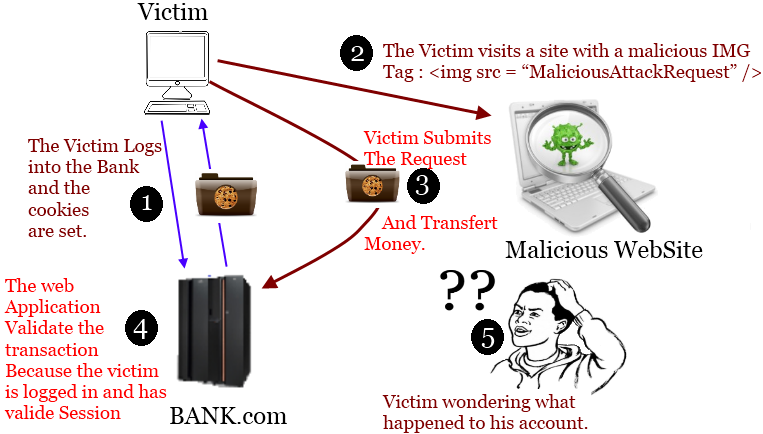
Cross-Site Request Forgery (CSRF) is an attack that tricks the victim into loading a page that contains a malicious request. It is malicious in the sense that it inherits the identity and privileges of the victim to perform an undesired function on the victim's behalf, like change the victim's e-mail address, home address, or password, or purchase something. CSRF attacks generally target functions that cause a state change on the server but can also be used to access sensitive data.

For most sites, browsers will automatically include with such requests any credentials associated with the site, such as the user's session cookie, basic auth credentials, IP address, Windows domain credentials, etc. Therefore, if the user is currently authenticated to the site, the site will have no way to distinguish this from a legitimate user request.

In this way, the attacker can make the victim perform actions that they didn't intend to, such as logout, purchase item, change account information, retrieve account information, or any other function provided by the vulnerable website.

Sometimes, it is possible to store the CSRF attack on the vulnerable site itself. Such vulnerabilities are called Stored CSRF flaws. This can be accomplished by simply storing an IMG or IFRAME tag in a field that accepts HTML, or by a more complex cross-site scripting attack. If the attack can store a CSRF attack in the site, the severity of the attack is amplified. In particular, the likelihood is increased because the victim is more likely to view the page containing the attack than some random page on the Internet. The likelihood is also increased because the victim is sure to be authenticated to the site already.

Synonyms: CSRF attacks are also known by a number of other names, including XSRF, "Sea Surf", Session Riding, Cross-Site Reference Forgery, Hostile Linking. Microsoft refers to this type of attack as a One-Click attack in their threat modeling process and many places in their online documentation.

The @Html.AntiForgeryToken() helper

Steven Sanderson's blog post "Prevent Cross-Site Request Forgery (CSRF) using ASP.NET MVC’s AntiForgeryToken() helper" is quite self explanatory on how to use the helper, but lets see how we can achieve this with our ajax requests as well.

Let's start with the JavaScript code. 

The easiest thing to do would be to create a custom ajax function where we can add the required data to pass to the server. Always good to add this layer of abstraction so that you can attach custom error handlers & what not.


//=============================================================
// This document contains common utilities that can be used in
// your Application (app). 
//=============================================================
(function (app, $) {
    app.getAntiForgeryToken = function () {
        return $('[name=__RequestVerificationToken]').val();
    };

    // Create a custom ajax function
    app.ajax = function(options) {
        
        // (a): Add the anti forgery tokens
        options.headers = options.headers || {};
        options.headers.__RequestVerificationToken = app.getAntiForgeryToken();

        // (b): Make the ajax call
        $.ajax(options);
        
    };
})(this.app = this.app || {}, jQuery);

So instead of calling $.ajax use app.ajax.

On your razor view

You simply add the call  to @Html.AntiForgeryToken(). This should generate in your html a hidden input field that looks like so ..


Your Controller

Decorate the controller with the "ValidateAntiForgeryTokenOnAllPosts" authorize attribute and add a definition for it.

 
    [AttributeUsage(AttributeTargets.Class)]
    public class ValidateAntiForgeryTokenOnAllPosts : AuthorizeAttribute
    {
        public override void OnAuthorization(AuthorizationContext filterContext)
        {
            var request = filterContext.HttpContext.Request;

            //  Only validate POSTs
            if (request.HttpMethod == WebRequestMethods.Http.Post)
            {
                //  Ajax POSTs and normal form posts have to be treated differently when it comes
                //  to validating the AntiForgeryToken
                if (request.IsAjaxRequest())
                {
                    var antiForgeryCookie = request.Cookies[AntiForgeryConfig.CookieName];

                    var cookieValue = antiForgeryCookie != null
                        ? antiForgeryCookie.Value
                        : null;

                    AntiForgery.Validate(cookieValue, request.Headers["__RequestVerificationToken"]);
                }
                else
                {
                    new ValidateAntiForgeryTokenAttribute()
                        .OnAuthorization(filterContext);
                }
            }
        }
    }

Don't forget to annotate your controller like so ..


**Note: This code is courtesy of @Richiban which made my work a whole lot easier. (http://richiban.wordpress.com/2013/02/06/validating-net-mvc-4-anti-forgery-tokens-in-ajax-requests/)

Further Reading (http://www.diaryofaninja.com/blog/2014/01/29/htmlantiforgerytoken-ndash-balancing-security-with-usability)

Wednesday, 25 September 2013

Venturing into the Revealing Module Pattern with JavaScript


I came across Addy Osmani's blog post about Learning JavaScript Design Patterns the other day. Loved it!

I think I'm one of those silly developers that gets super-duper excited when I see something that I like and then get to put it in practice. Well, I did exactly that. :)

I loved what Addy said about design patterns:
"Patterns are not an exact solution. It’s important that we remember the role of a pattern is merely to provide us with a solution scheme. Patterns don’t solve all design problems nor do they replace good software designers, however, they do support them".  
Let's get into it then ..

I was writing a rule engine for a part of our application. As you can see in the code below, the sp.editor.rules namespace contains the methods such as MeetsButtonCriteria that I can call.

 
$(function () {
    if (sp && sp.editor) {
        // Initialise the rules namespace
        sp.editor.rules = sp.editor.rules || {};
        
        // Private methods
        sp.editor._AreMultipleNodesSelected = function () {
            // Logic goes here.
        };


        // Rules for buttonize
        sp.editor.rules.MeetsButtonCriteria = function (editor) {
            if (sp.editor._AreMultipleNodesSelected(editor)) {
                // More Code Here ..
            } else {
                // More Code Here ..
            }

            return true; // Temp Return True
        };
    }
});

The namespace also contains other helper methods that MeetsButtonCriteria calls such as _AreMultipleNodesSelected. In the code I simply used a convention that private methods begin with an underscore.

While that seems to do the trick, I still found that rather clunky and non-defensive. This is where I thought that the Revealing Module Pattern might help.

The main benefit of the pattern is that the pattern allows the syntax of our scripts to be more consistent. It also makes it more clear at the end of the module which of our functions and variables may be accessed publicly which eases readability.

So this is what the modified script looks like.
 
sp.editor.rules = function () {
    // Declare the Private Functions Here!
    
    var areMultipleNodesSelected = function () {
        // Logic goes here.
    };
    
    var meetsButtonCriteria = function (editor) {
        if (areMultipleNodesSelected(editor)) {
            // More Code Here ..
        } else {
            // More Code Here ..
        }

        return true; // Temp Return True
    };

    // This is what gets returned (REVEALED).
    return {
        MeetsButtonCriteria: meetsButtonCriteria
    };
}();

Easy-peasy na? Also, just a word of advise, I forgot to convert sp.editor.rules to a self executing function and spent like 15 minutes trying to figure out what was wrong. Yikes! So don't forget that.

Sunday, 8 September 2013

Hack-ED with Kirk Jackson & Andy Prow


TechED 2013

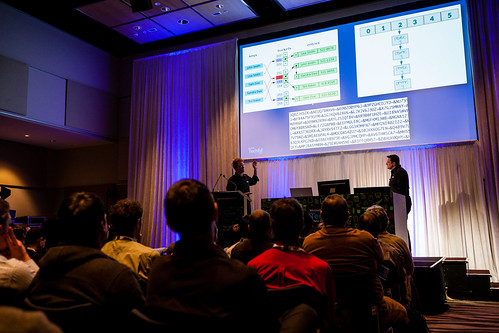
I recently attended 2 amazingly fun filled Hack-Ed sessions at Microsoft's TechEd, Australia. The speakers were Kirk Jackson and Andy Prow. And as promised, there was live hacking on stage and awkward humour that will made us cringe (in a good way). Not to mention, I won a chocolate bar! Yay!

I have posed a link to both their sessions below but I though I'd quickly touch on a few important things that they spoke about. I also highly recommend you follow their blog at http://www.hack-ed.com/.

Kirk and Andy went through a couple of recent security breaches around the world (I've listed a few below). But what was really funny was that most of them were easily preventable.

I know you've probably heard this before, but as web developers, security should not be an after-thought to the development process, but rather an integral part of your design. I highly recommend that you have a read through the Open Web Application Security Project (OWASP). They have recently updated their list of top 10 vulnerabilities to look out for, available at https://www.owasp.org/index.php/Top_10_2013-Top_10.

Interesting Security Breaches

Now here are some of the interesting attacks that Kirk and Andy mentioned.


Some interesting types of attacks


Security Sessions at TechED

Hack-Ed: Wheedling and Cajoling your way to Success (http://channel9.msdn.com/Events/TechEd/Australia/2013/ATC232)


Hack-Ed: Develop your Security Spidey Sense (http://channel9.msdn.com/Events/TechEd/Australia/2013/ATC233)


Thursday, 5 September 2013

I got 99 Problems but Visual Studio ain't one


Stuff from Microsoft TechED Australia 2013

So this is my first post from this year's Microsoft TechED. This being my first time to an event such as this, I've been super pumped and excited all along. The excitement and energy at the event is almost palpable.

The sessions I have attended thus far have been crazy fun. I must admit, when they previewed new features in Visual Studio 2013 I almost felt week in the knees!

Visual Studio 2013 comes with a swanky new CSS and HTML Editor with amazing type-specific intellisense. They've really taken intellisense to the next level with intellisense support for your JS Object model.

And added crazy new features, features like "Browser Link" can be described best as black magic. It leverage's SignalR and allows you to EDIT ACTUAL SOURCE CODE FROM WITHIN THE BROWSER! Say what!!!

Most of the older zen-coding features still remain, but even better, the "Format Selection" feature is so much more intuitive (I know it seems trivial but I really struggle with badly formatted code).

By the by, Visual Studio 2013 RC has been released and is available at [http://www.microsoft.com/visualstudio/eng/2013-preview#story-2013preview]. Don't forget to check out the Channel 9: Visual Studio 2013 RC video. You also might want to have a look at Scott's post about browser link (http://www.hanselman.com/blog/VisualStudio2013RCForWebDevelopersOneASPNETBrowserLinkAndOurDirection.aspx)

Loved Colin's sessions on WebAPI. Got some great pointers that I'll share in a subsequent post. Here's a sneak preview ..


Brendan's "Real Time web applications" demo of what one can achieve with SignalR was pretty impressive too. The source for his demo is at  http://t.co/EFCcrlqkoo. Brendan mentioned some interesting libraries like DurandalJS, PostalJS, Toastr, RequireJS (tutorials coming soon)

Just attended Scott Guthrie's "Building Real World Cloud Apps with Azure". Boy, does he have a presence! So much cooler to see/hear him in person instead of streaming him! Links to the source code from his presentation coming soon!

Finally a shout out to Tony Gooderham. Without your tweet I wouldn't have this title!

The sessions I plan to attend/have attended this week are as follows:

Tuesday, September 03 2013

3:15 pm - 4:30 pm
Developer Kick-Off Session: Stuff We Love Andrew Coates, Mads Kristensen, Brady Gaster, Ed Blankenship, Patrick Klug Arena 1A options

4:30 pm - 6:00 pm
Keynote: Blink and you’ll miss it Adam Pisoni Arena 2 options

6:00 pm - 9:00 pm
Welcome Reception

Wednesday, September 04 2013

8:15 am - 9:30 am
What’s New for ALM in Visual Studio 2013 and Team Foundation Server 2013 Adam Cogan, Damian Brady Central A

9:45 am - 11:00 am
What’s New in Visual Studio for Web Developers Mads Kristensen Arena 1A

11:30 am - 12:45 pm
Designing API-Enabled Applications Colin Bowern Meeting Rooms 5&6

11:30 am - 12:45 pm
Cross-Device Notification Services with C#, Xamarin and Windows Azure Mobile Services Simon Waight Arena 1A

1:45 pm - 3:00 pm
Developing Connected Apps with Windows Azure Mobile Service: Overview Nick Harris Central C

3:30 pm - 4:45 pm
Real-Time Web Applications with SignalR Brendan Kowitz Central C

5:00 pm - 6:15 pm
So, You Want to be a Professional Windows Phone Developer? Nick Randolph Central C

6:30 pm - 7:45 pm
Continuous Delivery - The Agile End to End Story for Developers & IT Pros! Morgan Webb Arena 2

Thursday, September 05 2013

8:15 am - 9:30 am
Building Cross-Platform Mobile Apps David Burela Central A

9:45 am - 11:00 am
Becoming a C# Time Lord Joseph Albahari Central A

9:45 am - 11:00 am
Cross Platform Mobile Web Development Brendan Kowitz Meeting Rooms 5&6

11:30 am - 12:45 pm
Climbing the Agile Testing Ladder featuring Visual Studio 2013, TFS 2013, Microsoft Test Manager 2013, and Lab Management 2013 Adam Cogan, Damian Brady Meeting Room 7

1:45 pm - 3:00 pm
Building Real World Cloud Apps with Windows Azure Part 1 Scott Guthrie Arena 2

3:30 pm - 4:45 pm
Unit Testing, Code Coverage, and Code Clone Analysis with Microsoft Visual Studio 2012 Richard Angus TLC - Theatre 1

5:00 pm - 6:15 pm
Load Testing with Team Foundation Service Anthony Borton Meeting Room 8

6:30 pm - 10:30 pm
Networking Event Thursday Networking Event Movie World

Friday, September 06 2013

8:15 am - 9:30 am
Using AngularJS in an ASP.Net Application Paul Glavich Meeting Room 6

9:45 am - 11:00 am
Hack-Ed: Wheedling and Cajoling your way to Success Kirk Jackson, Andy Prow Meeting Room 7

11:30 am - 12:45 pm
Hack-Ed: Develop your Security Spidey Sense Kirk Jackson, Andy Prow Meeting Room 7

1:45 pm - 3:00 pm
Azure Mobile Services Deep Dive into Node.js Scripting Glenn Block Meeting Room 6

3:00 pm - 4:00 pm
Closing Presentation: Cloud Computing: Own Tomorrow Scott Guthrie, John Azariah, James Miles Arena 2

Sunday, 23 June 2013

C# Console app that displays twitter feed using Linq To Twitter (using Single User Authorization)


I recently had to add a twitter feed to my existing ASP.NET MVC 4 application. All I had to do was pull the last 10 tweets for a given user. It took me a while (shamefully, 3 hours) to get it working so I thought of writing a simple tutorial that explains how to pull a twitter feed for a console app using LINQ to Twitter.

LINQ to Twitter is an open source 3rd party LINQ Provider for the Twitter micro-blogging service. It uses standard LINQ syntax for queries and includes method calls for changes via the Twitter API. 

What took me long to figure out was the way twitter has implemented authentication using OAuth. Before you do anything, make sure you read the Learning to use OAuth document.

In my example, I used Single User Authorization. Single User Authorization is designed for scenarios where you'll only ever have one account accessing Twitter. i.e. if your Web site does periodic Twitter updates, regardless of user or you have a server that monitors general information. 

Before we begin coding, we'll need to set-up this authorization scheme on twitter & generate certain tokens as shown below:

Start by creating a twitter account that your application will be using to access Twitter. This is easy-peasy. Log on to https://twitter.com/ and setup your account. I've created a dummy account for this (_roehit).

Once your account is setup, navigate to https://dev.twitter.com and sign in with your twitter credentails. 

You now need to create an application. This can be done at https://dev.twitter.com/apps by clicking "Create a new application".


You need to enter your application details. You need a Name, Description & a Website (Your application's publicly accessible home page). You can add a Callback URL but its not really required. (Note: The name can't include the word "twitter".)


Remember to agree to the terms and conditions.

You should now get directed to the application page. By default, the first tab ("Details" tab) is visible. You must click the "Api Keys" tab and then click the "Create my access token" button (you will need to scroll down). This in turn generates the access tokens (you may need to refresh the page). Your Keys and Access Tokens should now be available for use.


Once created, navigate to the "OAutth tool" tab to view your OAuth Settings. We will need the generated tokens for our applications. (Note: My tokens are crossed out to maintain their integrity.)

Take note of the following tokens as we will need these later:
  • Consumer key
  • Consumer secret
  • Access token
  • Access token secret


Now we begin coding. In this example we've created a simple C# console application.

Start by creating a new project. Choose the "Console Application" template. 

Use NuGet to add the linqtotwitter package to our application. 


And now add the code shown below:
/// <summary>
/// Controls the flow of the program.
/// </summary>
/// <param name="args">The args.</param>
static void Main(string[] args)
{
    // This is a super simple example that
    // retrieves the latest tweets of a given 
    // twitter user.

    // SECTION A: Initialise local variables
    Console.WriteLine("SECTION A: Initialise local variables");

    // Access token goes here .. (Please generate your own)
    const string accessToken = "Access token goes here .. (Please generate your own)";
    // Access token secret goes here .. (Please generate your own)
    const string accessTokenSecret = "Access token secret goes here .. (Please generate your own)";

    // Api key goes here .. (Please generate your own)
    const string consumerKey = "Api key goes here .. (Please generate your own)";
    // Api secret goes here .. (Please generate your own)
    const string consumerSecret = "Api secret goes here .. (Please generate your own)";

    // The twitter account name goes here
    const string twitterAccountToDisplay = "roeburg"; 


    // SECTION B: Setup Single User Authorisation
    Console.WriteLine("SECTION B: Setup Single User Authorisation");
    var authorizer = new SingleUserAuthorizer
    {
        CredentialStore = new InMemoryCredentialStore
        {
            ConsumerKey = consumerKey,
            ConsumerSecret = consumerSecret,
            OAuthToken = accessToken,
            OAuthTokenSecret = accessTokenSecret
        }
    };

    // SECTION C: Generate the Twitter Context
    Console.WriteLine("SECTION C: Generate the Twitter Context");
    var twitterContext = new TwitterContext(authorizer);

    // SECTION D: Get Tweets for user
    Console.WriteLine("SECTION D: Get Tweets for user");
    var statusTweets = from tweet in twitterContext.Status
                        where tweet.Type == StatusType.User &&
                                tweet.ScreenName == twitterAccountToDisplay &&
                                tweet.IncludeContributorDetails == true &&
                                tweet.Count == 10 &&
                                tweet.IncludeEntities == true
                        select tweet;

    // SECTION E: Print Tweets
    Console.WriteLine("SECTION E: Print Tweets");
    PrintTweets(statusTweets);
    Console.ReadLine();
}

/// <summary>
/// Prints the tweets.
/// </summary>
/// <param name="statusTweets">The status tweets.</param>
/// <exception cref="System.NotImplementedException"></exception>
private static void PrintTweets(IQueryable<Status> statusTweets)
{
    foreach (var statusTweet in statusTweets)
    {
        Console.WriteLine(string.Format("\n\nTweet From [{0}] at [{1}]: \n-{2}",
            statusTweet.ScreenName,
            statusTweet.CreatedAt,
            statusTweet.Text));
                
        Thread.Sleep(1000);
    }
}

This should now display the last 10 tweets for the specified user.

A copy of the project is available at http://1drv.ms/NPUIVW (download the Linq2Twitter zip). This is a Visual Studio 2013 Console Application with a target framework of .NET 4.5.1 using LinqToTwitter package verison 3.0.2.

Disclaimer: The code shown above is quite crude & includes no error handling of any sort. This is just to give you a starting point. You can extend the functionality as you desire.