So this is a first of a few posts I will be doing on a simple NHibernate application. This post is pretty basic but in my subsequent posts, I'll be adding more functionality and/or modifying components to include dependency injection using Microsoft Unity.
The base project is a minute modification of https://github.com/jagregory/fluent-nhibernate/wiki/Getting-started.
So here we go ...
1. Create a new Solution called "Project".
2. To it, add a class library called "Project.Domain". As the name suggests, this will represent your domain entities.

3. Create the Employee, Product and store Classes. I usually like to separate the Properties in partial classes.
4. So now, your project structure should look like ..

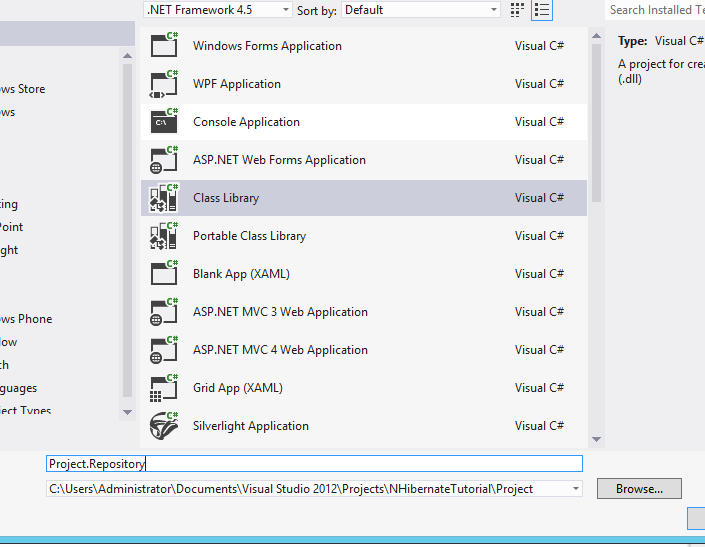
5. Add a new class library project "Project.Repository" to the solution like so ..

6. Its now time to add the relevant NuGet packages.. [ gotta love them :) ] ...


7. Its now time to create your mapping files. Start by adding a "Mappings" folder.
8. We now need to create a ClassMap for the Domain classes.
9. Remember to add a project reference to the domain project.

10. Now lets add a Console Application "Project.DatabaseSetup" that we will use to setup the database.
11. We'll start by adding a connection string to the console app's app.config.

12. Add references to the domain and mapping projects.
13. The code for the program is given here ...
14. Remember to add the relevant project references.

15. And now, you should be able to run the application. :)
The complete source is available here: http://sdrv.ms/151sjja
References: https://github.com/jagregory/fluent-nhibernate/wiki/Getting-started.
The base project is a minute modification of https://github.com/jagregory/fluent-nhibernate/wiki/Getting-started.
So here we go ...
1. Create a new Solution called "Project".
2. To it, add a class library called "Project.Domain". As the name suggests, this will represent your domain entities.

3. Create the Employee, Product and store Classes. I usually like to separate the Properties in partial classes.
public class Employee
{
  public virtual int Id { get; protected set; }
  public virtual string FirstName { get; set; }
  public virtual string LastName { get; set; }
  public virtual Store Store { get; set; }
}

public class Product
{
  public virtual int Id { get; protected set; }
  public virtual string Name { get; set; }
  public virtual double Price { get; set; }
  public virtual IList<Store> StoresStockedIn { get; protected set; }

  public Product()
  {
    StoresStockedIn = new List<Store>();
  }
}

public class Store
{
  public virtual int Id { get; protected set; }
  public virtual string Name { get; set; }
  public virtual IList<Product> Products { get; set; }
  public virtual IList<Employee> Staff { get; set; }

  public Store()
  {
    Products = new List<Product>();
    Staff = new List<Employee>();
  }

  public virtual void AddProduct(Product product)
  {
    product.StoresStockedIn.Add(this);
    Products.Add(product);
  }

  public virtual void AddEmployee(Employee employee)
  {
    employee.Store = this;
    Staff.Add(employee);
  }
}
4. So now, your project structure should look like ..

5. Add a new class library project "Project.Repository" to the solution like so ..
6. Its now time to add the relevant NuGet packages.. [ gotta love them :) ] ...


7. Its now time to create your mapping files. Start by adding a "Mappings" folder.
8. We now need to create a ClassMap for the Domain classes.
public class StoreMap: ClassMap<Store>
{
    public StoreMap()
    {
        // Set the Id
        Id(x => x.Id);

        // Set Properties
        Map(x => x.Name);

        // Set References
        HasMany(x => x.Staff)
            .Inverse().Cascade.All();
        HasManyToMany(x => x.Products)
            .Cascade.All().Table("StoreProduct");
    }
}

public class ProductMap: ClassMap<Product>
{
    public ProductMap()
    {
        // Set Id
        Id(x => x.Id);

        // Set Properties
        Map(x => x.Name);
        Map(x => x.Price);

        // Set References
        HasManyToMany(x => x.StoresStockedIn)
            .Cascade.All().Inverse().Table("StoreProduct");
    }
}

public class StoreMap: ClassMap<Store>
{
    public StoreMap()
    {
        // Set the Id
        Id(x => x.Id);

        // Set Properties
        Map(x => x.Name);

        // Set References
        HasMany(x => x.Staff)
            .Inverse().Cascade.All();
        HasManyToMany(x => x.Products)
            .Cascade.All().Table("StoreProduct");
    }
}
9. Remember to add a project reference to the domain project.

10. Now lets add a Console Application "Project.DatabaseSetup" that we will use to setup the database.
11. We'll start by adding a connection string to the console app's app.config.

12. Add references to the domain and mapping projects.
13. The code for the program is given here ...
using FluentNHibernate.Cfg;
using FluentNHibernate.Cfg.Db;
using NHibernate;
using NHibernate.Tool.hbm2ddl;
using Project.Domain;
using Project.Repository.Mappings;
using System;
using System.Collections.Generic;
using System.Configuration;
using System.Linq;
using System.Text;
using System.Threading.Tasks;

namespace Project.DatabaseSetup
{
    class Program
    {
        static void Main(string[] args)
        {
            var sessionFactory = CreateSessionFactory();
            using (var session = sessionFactory.OpenSession())
            {
                using (var transaction = session.BeginTransaction())
                {
                    // create a couple of Stores each with some Products and Employees
                    var barginBasin = new Store { Name = "Bargin Basin" };
                    var superMart = new Store { Name = "SuperMart" };

                    var potatoes = new Product { Name = "Potatoes", Price = 3.60 };
                    var fish = new Product { Name = "Fish", Price = 4.49 };
                    var milk = new Product { Name = "Milk", Price = 0.79 };
                    var bread = new Product { Name = "Bread", Price = 1.29 };
                    var cheese = new Product { Name = "Cheese", Price = 2.10 };
                    var waffles = new Product { Name = "Waffles", Price = 2.41 };

                    var daisy = new Employee { FirstName = "Daisy", LastName = "Harrison" };
                    var jack = new Employee { FirstName = "Jack", LastName = "Torrance" };
                    var sue = new Employee { FirstName = "Sue", LastName = "Walkters" };
                    var bill = new Employee { FirstName = "Bill", LastName = "Taft" };
                    var joan = new Employee { FirstName = "Joan", LastName = "Pope" };

                    // add products to the stores, there's some crossover in the products in each
                    // store, because the store-product relationship is many-to-many
                    AddProductsToStore(barginBasin, potatoes, fish, milk, bread, cheese);
                    AddProductsToStore(superMart, bread, cheese, waffles);

                    // add employees to the stores, this relationship is a one-to-many, so one
                    // employee can only work at one store at a time
                    AddEmployeesToStore(barginBasin, daisy, jack, sue);
                    AddEmployeesToStore(superMart, bill, joan);

                    // save both stores, this saves everything else via cascading
                    session.SaveOrUpdate(barginBasin);
                    session.SaveOrUpdate(superMart);

                    transaction.Commit();
                }

                // retreive all stores and display them
                using (session.BeginTransaction())
                {
                    var stores = session.CreateCriteria(typeof(Store))
                    .List<Store>();

                    foreach (var store in stores)
                    {
                        WriteStorePretty(store);
                    }
                }

                System.Console.ReadKey();
            }
        }

        private static void WriteStorePretty(Store store)
        {
            System.Console.WriteLine("Store: " + store.Name);
        }

        public static void AddProductsToStore(Store store, params Product[] products)
        {
            foreach (var product in products)
            {
                store.AddProduct(product);
            }
        }

        public static void AddEmployeesToStore(Store store, params Employee[] employees)
        {
            foreach (var employee in employees)
            {
                store.AddEmployee(employee);
            }
        }

        private static ISessionFactory CreateSessionFactory()
        {
            var connectionString = ConfigurationManager
                    .ConnectionStrings["Connection"]
                    .ConnectionString;
            return Fluently
                .Configure()
                .Database(MsSqlConfiguration
                    .MsSql2008
                    .ConnectionString(connectionString))
                .Mappings(m =>
                {
                    m.FluentMappings.AddFromAssemblyOf<EmployeeMap>();
                    m.FluentMappings.AddFromAssemblyOf<ProductMap>();
                    m.FluentMappings.AddFromAssemblyOf<StoreMap>();

                })
                .ExposeConfiguration(BuildSchema)
                .BuildSessionFactory();
        }

        private static void BuildSchema(NHibernate.Cfg.Configuration config)
        {
            // this NHibernate tool takes a configuration (with mapping info in)
            // and exports a database schema from it
            new SchemaExport(config)
                .Create(false, true);
        }
    }
}
14. Remember to add the relevant project references.

15. And now, you should be able to run the application. :)
The complete source is available here: http://sdrv.ms/151sjja
References: https://github.com/jagregory/fluent-nhibernate/wiki/Getting-started.
