Tuesday, 26 March 2013

Formatting TFN and ABN

I'm not entirely sure if I've mentioned this before BUT I happen to LOVE extension methods.

Extension methods enable you to "add" methods to existing types without creating a new derived type, recompiling, or otherwise modifying the original type. Extension methods are a special kind of static method, but they are called as if they were instance methods on the extended type. For client code written in C# and Visual Basic, there is no apparent difference between calling an extension method and the methods that are actually defined in a type.

I recently had to write some of them up for Formating TFN and ABNs.

Here are the TfnAbnExtnesion Methods. (I could have also used regular expression to accomplish this but I chose to keep it simple/maintainable.)
 
public static class TfnAbnExtensions
{
    /// <summary>
    /// Formats the TFN.
    /// If the length is 9 char, return XXX XXX XXX
    /// If the length is 8 char, return XXX XXX XX
    /// </summary>
    /// <param name="tfn">The TFN.</param>
    /// <returns></returns>
    public static string FormatTfn(this string tfn)
    {
        // Ignore null/empty strings
        if (string.IsNullOrWhiteSpace(tfn))
        {
            return string.Empty;
        }

        // Remove any existing whitespaces
        var newtfn = tfn.UnFormatAbnTfn();
            
        var result = string.Empty;
        var tfnCharArray = newtfn.ToCharArray();

        for (int i = 0; i < tfnCharArray.Length; i++)
        {
            if (i % 3 == 0 && i != 0)
            {
                result += " ";
            }

            result += tfnCharArray[i].ToString(CultureInfo.InvariantCulture);
        }

        return result;
    }


    /// <summary>
    /// Formats the ABN.
    /// </summary>
    /// <param name="abn">The ABN.</param>
    /// <returns></returns>
    public static string FormatAbn(this string abn)
    {
        // Ignore null/empty strings
        if (string.IsNullOrWhiteSpace(abn))
        {
            return string.Empty;
        }

        // Un-format the ABN
        var newtfn = abn.UnFormatAbnTfn();
            
        var result = string.Empty;
        var abnCharArray = newtfn.ToCharArray();
        var tempCounter = 0;

        for (int i = 0; i < abnCharArray.Length; i++)
        {
            // Second character & then every 3rd char
            if (i == 2 || tempCounter == 3)
            {
                result += " ";
                tempCounter = 0;
            }

            tempCounter++;
            result += abnCharArray[i].ToString(CultureInfo.InvariantCulture);
        }

        return result;
    }


    /// <summary>
    /// Un formats the ABN or TFN by removing blank spaces
    /// </summary>
    /// <param name="abnTfn">The ABN or TFN.</param>
    /// <returns></returns>
    public static string UnFormatAbnTfn(this string abnTfn)
    {
        return string.IsNullOrWhiteSpace(abnTfn) ? abnTfn :
            abnTfn
            .Replace(" ", string.Empty)
            .Replace("-", string.Empty)
            .Replace("/", string.Empty);
    }
    
}

References: Extension Methods (C# Programming Guide)

Tuesday, 19 February 2013

Fluent NHibernate .. Or as my manager calls it "Shibernate" (Tutorial 1)

So this is a first of a few posts I will be doing on a simple NHibernate application. This post is pretty basic but in my subsequent posts, I'll be adding more functionality and/or modifying components to include dependency injection using Microsoft Unity.

The base project is a minute modification of https://github.com/jagregory/fluent-nhibernate/wiki/Getting-started.

So here we go ...

1. Create a new Solution called "Project".

2. To it, add a class library called "Project.Domain". As the name suggests, this will represent your domain entities.


3. Create the Employee, Product and store Classes. I usually like to separate the Properties in partial classes.

 
public class Employee
{
  public virtual int Id { get; protected set; }
  public virtual string FirstName { get; set; }
  public virtual string LastName { get; set; }
  public virtual Store Store { get; set; }
}

public class Product
{
  public virtual int Id { get; protected set; }
  public virtual string Name { get; set; }
  public virtual double Price { get; set; }
  public virtual IList<Store> StoresStockedIn { get; protected set; }

  public Product()
  {
    StoresStockedIn = new List<Store>();
  }
}

public class Store
{
  public virtual int Id { get; protected set; }
  public virtual string Name { get; set; }
  public virtual IList<Product> Products { get; set; }
  public virtual IList<Employee> Staff { get; set; }

  public Store()
  {
    Products = new List<Product>();
    Staff = new List<Employee>();
  }

  public virtual void AddProduct(Product product)
  {
    product.StoresStockedIn.Add(this);
    Products.Add(product);
  }

  public virtual void AddEmployee(Employee employee)
  {
    employee.Store = this;
    Staff.Add(employee);
  }
}

4. So now, your project structure should look like ..


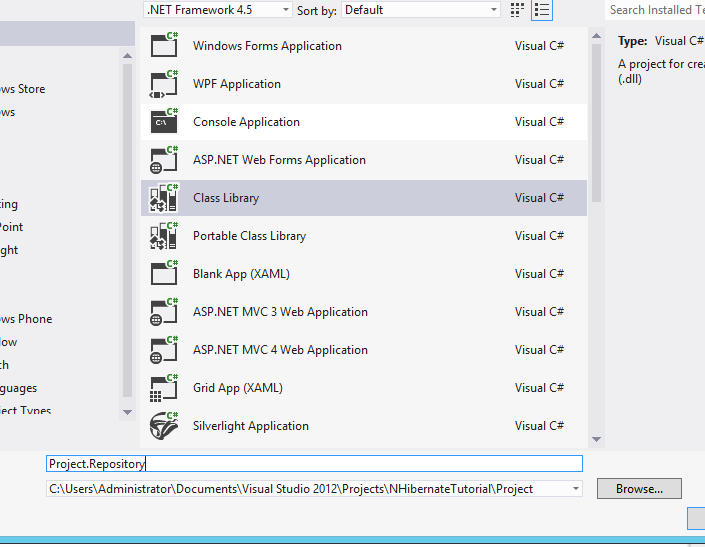
5. Add a new class library project "Project.Repository" to the solution like so ..


6. Its now time to add the relevant NuGet packages.. [ gotta love them :) ] ...


7. Its now time to create your mapping files. Start by adding a "Mappings" folder.

8. We now need to create a ClassMap for the Domain classes.
 
public class StoreMap: ClassMap<Store>
{
    public StoreMap()
    {
        // Set the Id
        Id(x => x.Id);

        // Set Properties
        Map(x => x.Name);

        // Set References
        HasMany(x => x.Staff)
            .Inverse().Cascade.All();
        HasManyToMany(x => x.Products)
            .Cascade.All().Table("StoreProduct");
    }
}

public class ProductMap: ClassMap<Product>
{
    public ProductMap()
    {
        // Set Id
        Id(x => x.Id);

        // Set Properties
        Map(x => x.Name);
        Map(x => x.Price);

        // Set References
        HasManyToMany(x => x.StoresStockedIn)
            .Cascade.All().Inverse().Table("StoreProduct");
    }
}

public class StoreMap: ClassMap<Store>
{
    public StoreMap()
    {
        // Set the Id
        Id(x => x.Id);

        // Set Properties
        Map(x => x.Name);

        // Set References
        HasMany(x => x.Staff)
            .Inverse().Cascade.All();
        HasManyToMany(x => x.Products)
            .Cascade.All().Table("StoreProduct");
    }
}

9. Remember to add a project reference to the domain project.


10.  Now lets add a Console Application "Project.DatabaseSetup" that we will use to setup the database.

11. We'll start by adding a connection string to the console app's app.config.


12. Add references to the domain and mapping projects.

13. The code for the program is given here ...
using FluentNHibernate.Cfg;
using FluentNHibernate.Cfg.Db;
using NHibernate;
using NHibernate.Tool.hbm2ddl;
using Project.Domain;
using Project.Repository.Mappings;
using System;
using System.Collections.Generic;
using System.Configuration;
using System.Linq;
using System.Text;
using System.Threading.Tasks;

namespace Project.DatabaseSetup
{
    class Program
    {
        static void Main(string[] args)
        {
            var sessionFactory = CreateSessionFactory();
            using (var session = sessionFactory.OpenSession())
            {
                using (var transaction = session.BeginTransaction())
                {
                    // create a couple of Stores each with some Products and Employees
                    var barginBasin = new Store { Name = "Bargin Basin" };
                    var superMart = new Store { Name = "SuperMart" };

                    var potatoes = new Product { Name = "Potatoes", Price = 3.60 };
                    var fish = new Product { Name = "Fish", Price = 4.49 };
                    var milk = new Product { Name = "Milk", Price = 0.79 };
                    var bread = new Product { Name = "Bread", Price = 1.29 };
                    var cheese = new Product { Name = "Cheese", Price = 2.10 };
                    var waffles = new Product { Name = "Waffles", Price = 2.41 };

                    var daisy = new Employee { FirstName = "Daisy", LastName = "Harrison" };
                    var jack = new Employee { FirstName = "Jack", LastName = "Torrance" };
                    var sue = new Employee { FirstName = "Sue", LastName = "Walkters" };
                    var bill = new Employee { FirstName = "Bill", LastName = "Taft" };
                    var joan = new Employee { FirstName = "Joan", LastName = "Pope" };

                    // add products to the stores, there's some crossover in the products in each
                    // store, because the store-product relationship is many-to-many
                    AddProductsToStore(barginBasin, potatoes, fish, milk, bread, cheese);
                    AddProductsToStore(superMart, bread, cheese, waffles);

                    // add employees to the stores, this relationship is a one-to-many, so one
                    // employee can only work at one store at a time
                    AddEmployeesToStore(barginBasin, daisy, jack, sue);
                    AddEmployeesToStore(superMart, bill, joan);

                    // save both stores, this saves everything else via cascading
                    session.SaveOrUpdate(barginBasin);
                    session.SaveOrUpdate(superMart);

                    transaction.Commit();
                }

                // retreive all stores and display them
                using (session.BeginTransaction())
                {
                    var stores = session.CreateCriteria(typeof(Store))
                    .List<Store>();

                    foreach (var store in stores)
                    {
                        WriteStorePretty(store);
                    }
                }

                System.Console.ReadKey();
            }
        }

        private static void WriteStorePretty(Store store)
        {
            System.Console.WriteLine("Store: " + store.Name);
        }

        public static void AddProductsToStore(Store store, params Product[] products)
        {
            foreach (var product in products)
            {
                store.AddProduct(product);
            }
        }

        public static void AddEmployeesToStore(Store store, params Employee[] employees)
        {
            foreach (var employee in employees)
            {
                store.AddEmployee(employee);
            }
        }

        private static ISessionFactory CreateSessionFactory()
        {
            var connectionString = ConfigurationManager
                    .ConnectionStrings["Connection"]
                    .ConnectionString;
            return Fluently
                .Configure()
                .Database(MsSqlConfiguration
                    .MsSql2008
                    .ConnectionString(connectionString))
                .Mappings(m =>
                {
                    m.FluentMappings.AddFromAssemblyOf<EmployeeMap>();
                    m.FluentMappings.AddFromAssemblyOf<ProductMap>();
                    m.FluentMappings.AddFromAssemblyOf<StoreMap>();

                })
                .ExposeConfiguration(BuildSchema)
                .BuildSessionFactory();
        }

        private static void BuildSchema(NHibernate.Cfg.Configuration config)
        {
            // this NHibernate tool takes a configuration (with mapping info in)
            // and exports a database schema from it
            new SchemaExport(config)
                .Create(false, true);
        }
    }
}

14. Remember to add the relevant project references.

15. And now, you should be able to run the application. :)


The complete source is available here: http://sdrv.ms/151sjja


References:  https://github.com/jagregory/fluent-nhibernate/wiki/Getting-started.


Thursday, 7 February 2013

Problem with delegate within foreach

The picture shown below represents my data. Data that I have and the expected result at the end:


The logic being, that for every date in the list of dates, find the associated price tuple where the effective date is less than or equal to the date and is the max date.

The structure of Price is shown below.

 
public class Price
{
    public int PriceId { get; set; }

    public DateTime EffectiveDate { get; set; }

    public double PriceAmount { get; set; }

    public DateTime CreatedOn { get; set; }
}

I have a static method that gets me the data that I need
 
static List<Price> GetPrices()
{
    return new List<Price>()
    {
        new Price()
        {
            PriceId = 1, EffectiveDate = new DateTime(2012,1,1),
            PriceAmount = 100, CreatedOn = new DateTime(2012,1,1)
        },
        new Price()
        {
            PriceId = 2, EffectiveDate = new DateTime(2012,1,1),
            PriceAmount = 200, CreatedOn = new DateTime(2012,1,1)
        },
        new Price()
        {
            PriceId = 3, EffectiveDate = new DateTime(2012,1,2),
            PriceAmount = 300, CreatedOn = new DateTime(2012,1,2)
        },
        new Price()
        {
            PriceId = 4, EffectiveDate = new DateTime(2012,1,3),
            PriceAmount = 400, CreatedOn = new DateTime(2012,1,3)
        },
        new Price()
        {
            PriceId = 5, EffectiveDate = new DateTime(2012,1,4),
            PriceAmount = 500, CreatedOn = new DateTime(2012,1,4)
        },
        new Price()
        {
            PriceId = 6, EffectiveDate = new DateTime(2012,1,5),
            PriceAmount = 600, CreatedOn = new DateTime(2012,1,5)
        },
        new Price()
        {
            PriceId = 7, EffectiveDate = new DateTime(2012,1,16),
            PriceAmount = 700, CreatedOn = new DateTime(2012,1,16)
        },
        new Price()
        {
            PriceId = 8, EffectiveDate = new DateTime(2012,1,27),
            PriceAmount = 800, CreatedOn = new DateTime(2012,1,27)
        },
        new Price()
        {
            PriceId = 9, EffectiveDate = new DateTime(2012,1,28),
            PriceAmount = 900, CreatedOn = new DateTime(2012,1,28)
        },
    };
}

This is the original code that I wrote to get me the information that I needed:

 
// This represents your List of dates
var listOfDates = new List<DateTime>()
                        {
                        new DateTime(2012,1,2),
                        new DateTime(2012,1,10),
                        new DateTime(2012,1,15),
                        new DateTime(2012,1,27)
                        };

// This represents your prices
var prices = GetPrices();

// Initialise the expected result set
var expectedResultSet = new List<Price>();

// Get your expected result set
listOfDates.ForEach(date =>
                        {
                            // In each date, find the price that you're after
                            var price = prices
                                .Where(p => p.EffectiveDate <= date)
                                .OrderByDescending(result => result.EffectiveDate)
                                .FirstOrDefault();

                            if(price != null)
                            {
                                // Fix the Date
                                price.EffectiveDate = date;

                                // Add it to the expected result
                                expectedResultSet.Add(price);
                            }
                        });

// Print the Result
Print(expectedResultSet);

If you check the output, this does NOT give you the result you were expecting!!!
Now to get the result you're after, you'll need to iterate through the list in a different manner:

(This is just one option ... )

 
// Get Dates and Prices
listOfDates = GetListOfDates();
prices = GetPrices();

// Step A: Get a Tuple of Date & Price
List<Tuple<DateTime, Price>> datesWithAssociatedPrice;
datesWithAssociatedPrice = listOfDates
    // Step 1: Select the Requested Date and Price(S) 
    // where the Price's Effective Date <= the date (from range)
    // [One Date .. Many Prices]
.Select(eachDate => new
{
    RequestedDate = eachDate,
    AssociatedPrices = prices.Where(p => p.EffectiveDate <= eachDate)
})

// Step 2: Now iterate through the list of Date, List & in each tuple,
    // find the first instance of Price with the Max Effective date
.Select(dateAndPrice => new
{
    RequestedDate = dateAndPrice.RequestedDate,
    AssociatedPrice = dateAndPrice
        .AssociatedPrices
        .First(price => price.EffectiveDate ==
            dateAndPrice.AssociatedPrices.Max(item => item.EffectiveDate))
})

// Step 3: Now get the data you need as a List<Tuple<DateTime, Price>> tuple
.Select(tuple => 
    new Tuple<DateTime, Price>(tuple.RequestedDate, 
        tuple.AssociatedPrice)).ToList();

// Print using an extension method :)
Print(datesWithAssociatedPrice.ToPriceList());

And now the result is what is expected.


The complete source is available here: http://snipt.org/zQjc0#expand


References: http://stackoverflow.com/questions/2571398/problem-with-anonymouse-delegate-within-foreach


Tuesday, 22 January 2013

JavaScript Inheritance In 6 Basic Steps


// Define Base Class
function BaseClass() { } 

// Define a Function
BaseClass.prototype.SomeFunction = function () { alert("Base Class SomeFunction"); } 

// Define Child Class
function ChildClass() {
    BaseClass.call(this); // Call the Parent Constructor
}

// Specify that the ChildClass Inherits from the base class
ChildClass.prototype = new BaseClass(); 

// Ensure that the Child Class constructor points to itself & not the Base Class
ChildClass.prototype.constructor = ChildClass;

// Override the "SomeFunction" from the Base Class
ChildClass.prototype.SomeFunction = function () { alert("Child Class SomeFunction"); }

Now we can create an instance of the Child class like so ..
 
// Create an instance of the ChildClass
var object = new ChildClass();
And now, a call to the "SomeFunction" returns the overriden implementation.
 
// Call the "SomeFunction" method.
object.SomeFunction(); // This returns an alert containing: "Child Class SomeFunction"

References: Introduction to Object-Oriented JavaScript

Monday, 7 January 2013

Unit Testing HttpContext.Current.Session in MVC3 .NET

We recently changed some functionality where during the "CREATE" process, we go through a wizard to save application data. This data is saved only to the session in the final step when the user clicks the final submit.

This was easy enough to implement but when I started writing unit tests for my static methods that Add, Update, Delete or Modify the contents of our application data in the session, I got the following error:

System.NullReferenceException: Object reference not set to an instance of an object.


Turns out I had forgotten to setup the HttpContext.

The following "TestInitialise" method fixed my problem :)

 
[TestInitialize]
public void TestSetup()
{
    // We need to setup the Current HTTP Context as follows:            

    // Step 1: Setup the HTTP Request
    var httpRequest = new HttpRequest("", "http://localhost/", "");

    // Step 2: Setup the HTTP Response
    var httpResponce = new HttpResponse(new StringWriter());

    // Step 3: Setup the Http Context
    var httpContext = new HttpContext(httpRequest, httpResponce);
    var sessionContainer = 
        new HttpSessionStateContainer("id", 
                                       new SessionStateItemCollection(),
                                       new HttpStaticObjectsCollection(), 
                                       10, 
                                       true,
                                       HttpCookieMode.AutoDetect,
                                       SessionStateMode.InProc, 
                                       false);
    httpContext.Items["AspSession"] = 
        typeof(HttpSessionState)
        .GetConstructor(
                            BindingFlags.NonPublic | BindingFlags.Instance,
                            null, 
                            CallingConventions.Standard,
                            new[] { typeof(HttpSessionStateContainer) },
                            null)
        .Invoke(new object[] { sessionContainer });

    // Step 4: Assign the Context
    HttpContext.Current = httpContext;
}
 
[TestMethod]
public void BasicTest_Push_Item_Into_Session()
{
    // Arrange
    var itemValue = "RandomItemValue";
    var itemKey = "RandomItemKey";
            
    // Act
    HttpContext.Current.Session.Add(itemKey, itemValue);
            
    // Assert
    Assert.AreEqual(HttpContext.Current.Session[itemKey], itemValue);
}


References: http://stackoverflow.com/questions/9624242/setting-the-httpcontext-current-session-in-unit-test

Wednesday, 19 December 2012

Build Status Notification Lamp - TFS2010


Web Mail Notifier Sillyness


We have a dedicated build wall which is pretty efficient in displaying the build information. It really is!

BUT, ever since I moved my desk away from the big screen TV's that display the build notifications, it makes it difficult to tell what's the status of the builds at our morning stand-up.

This was until a couple of days ago a friend got me hooked on to the "USB Web Mail Notifier" available here. (Although, I bought mine off some random dude on EBay (from the UK).

All I really needed was to know if our Nightly Builds that run our Unit and Integrations Tests failed.

Now I know that there are heaps of other ways to get this information but the one I went with appealed to my inner nerd :)

By using a simple powershell script I am able to query our Team Foundation Server (TFS-2010) to see if the latest Nightly Build has been successful.

The powershell script and the binaries required to use the USB light are available here at http://tiny.cc/BuildNotification.

You need to customise the powershell script by entering your details in the  "Set user variables" section of the script:


This is what it looks like.

When developers have been naughty (and not run integration tests locally before checking in) ...


But after you fix it, all is good ..


Thursday, 6 December 2012

Find Overlapping Date Ranges


I recently had to implement a "DateRange" validator to check for any overlaps in the date ranges.

Here is my approach to it :

I started with a custom DateRange class.
 
public class DateRange
{
    public int SortOrder { get; set; }
    public DateTime Start { get; set; }
    public DateTime End { get; set; }

    public DateRange() {}

    public DateRange(DateTime sTime, DateTime eTime)
    {
        Start = sTime;
        End = eTime;
    }
} 

Then I call the "HasOverlap" method on my validator to check for overlaps.
 
/*
* LOGIC:
* 
* 1. Take a List of date ranges. Example:
            [Tuple A]         --------         [Sort Order 1]
            [Tuple B]--------                  [Sort Order 2]
            [Tuple C]     --------             [Sort Order 3]
            [Tuple D]     --------             [Sort Order 4]
            [Tuple E]             --------     [Sort Order 5]
            [Tuple F]     ----------           [Sort Order 6]
         
* 2. Now sort the range by start + End Dates. This results in:
            [Tuple B]--------                  [Sort Order 1]
            [Tuple C]     --------             [Sort Order 2]
            [Tuple D]     --------             [Sort Order 3]
            [Tuple F]     ----------           [Sort Order 4]
            [Tuple A]         --------         [Sort Order 5]
            [Tuple E]             --------     [Sort Order 6]    
         
* 3. The Logic is that there will be an overlap IF EVEN ONE of 
*    the 2 base conditions are met:
*      (a) After sorting the list, a given tuple (TUPLE X) 
*          will be deemed overlapping 
*              if the END-DATE of (TUPLE X) is GREATER THAN the START-DATE 
*              of ANY tuple WHERE the sort order is GREATER THAN that of (TUPLE X)
*          
*      --- OR ---
*      
*      (b) After sorting the list, a given tuple (TUPLE X) 
*          will be deemed overlapping 
*              if the START-DATE and END-DATE of (TUPLE X) MATCHES 
*              the START-DATE and END-DATE of ANY tuple 
*              WHERE the sort order is GREATER THAN that of (TUPLE X)
*/
private bool HasOverlap(IList<DateRange> ranges)
{
    // 1. Sort Dates based on Start & End Dates
    var sortedRange = ranges
                        .OrderBy(p => p.Start)
                        .ThenBy(p => p.End)
                        .ToList();

    var sortCounter = 0;
    sortedRange.ForEach(e =>
    {
        e.SortOrder = sortCounter;
        sortCounter++;
    });


    // 2. Check if the end dates are > any start dates except the same one 
    return sortedRange
        .Any(tuple => (from innerLoop in sortedRange
                        where (
                                tuple.End > innerLoop.Start &&
                                innerLoop.SortOrder > tuple.SortOrder
                                ) ||
                                (
                                tuple.End == innerLoop.End &&
                                tuple.Start == innerLoop.Start &&
                                innerLoop.SortOrder > tuple.SortOrder
                                )
                        select innerLoop).Any());
}

Additionally I also pass my DateRanges through a sanity check to ensure that the start < end dates.