So this is a first of a few posts I will be doing on a simple NHibernate application. This post is pretty basic but in my subsequent posts, I'll be adding more functionality and/or modifying components to include dependency injection using Microsoft Unity.
The base project is a minute modification of
https://github.com/jagregory/fluent-nhibernate/wiki/Getting-started.
So here we go ...
1. Create a new Solution called "Project".
2. To it, add a class library called "Project.Domain". As the name suggests, this will represent your domain entities.
3. Create the Employee, Product and store Classes. I usually like to separate the Properties in partial classes.
public class Employee
{
  public virtual int Id { get; protected set; }
  public virtual string FirstName { get; set; }
  public virtual string LastName { get; set; }
  public virtual Store Store { get; set; }
}

public class Product
{
  public virtual int Id { get; protected set; }
  public virtual string Name { get; set; }
  public virtual double Price { get; set; }
  public virtual IList<Store> StoresStockedIn { get; protected set; }

  public Product()
  {
    StoresStockedIn = new List<Store>();
  }
}

public class Store
{
  public virtual int Id { get; protected set; }
  public virtual string Name { get; set; }
  public virtual IList<Product> Products { get; set; }
  public virtual IList<Employee> Staff { get; set; }

  public Store()
  {
    Products = new List<Product>();
    Staff = new List<Employee>();
  }

  public virtual void AddProduct(Product product)
  {
    product.StoresStockedIn.Add(this);
    Products.Add(product);
  }

  public virtual void AddEmployee(Employee employee)
  {
    employee.Store = this;
    Staff.Add(employee);
  }
}
4. So now, your project structure should look like ..
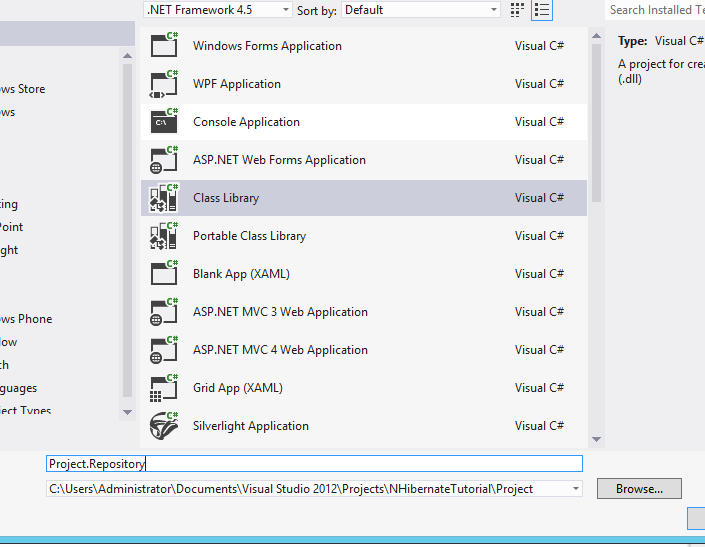
5. Add a new class library project "Project.Repository" to the solution like so ..
6. Its now time to add the relevant NuGet packages.. [ gotta love them :) ] ...
7. Its now time to create your mapping files. Start by adding a "Mappings" folder.
8. We now need to create a ClassMap for the Domain classes.
public class StoreMap: ClassMap<Store>
{
    public StoreMap()
    {
        // Set the Id
        Id(x => x.Id);

        // Set Properties
        Map(x => x.Name);

        // Set References
        HasMany(x => x.Staff)
            .Inverse().Cascade.All();
        HasManyToMany(x => x.Products)
            .Cascade.All().Table("StoreProduct");
    }
}

public class ProductMap: ClassMap<Product>
{
    public ProductMap()
    {
        // Set Id
        Id(x => x.Id);

        // Set Properties
        Map(x => x.Name);
        Map(x => x.Price);

        // Set References
        HasManyToMany(x => x.StoresStockedIn)
            .Cascade.All().Inverse().Table("StoreProduct");
    }
}

public class StoreMap: ClassMap<Store>
{
    public StoreMap()
    {
        // Set the Id
        Id(x => x.Id);

        // Set Properties
        Map(x => x.Name);

        // Set References
        HasMany(x => x.Staff)
            .Inverse().Cascade.All();
        HasManyToMany(x => x.Products)
            .Cascade.All().Table("StoreProduct");
    }
}
9. Remember to add a project reference to the domain project.
10. Now lets add a Console Application "Project.DatabaseSetup" that we will use to setup the database.
11. We'll start by adding a connection string to the console app's app.config.
12. Add references to the domain and mapping projects.
13. The code for the program is given here ...
using FluentNHibernate.Cfg;
using FluentNHibernate.Cfg.Db;
using NHibernate;
using NHibernate.Tool.hbm2ddl;
using Project.Domain;
using Project.Repository.Mappings;
using System;
using System.Collections.Generic;
using System.Configuration;
using System.Linq;
using System.Text;
using System.Threading.Tasks;

namespace Project.DatabaseSetup
{
    class Program
    {
        static void Main(string[] args)
        {
            var sessionFactory = CreateSessionFactory();
            using (var session = sessionFactory.OpenSession())
            {
                using (var transaction = session.BeginTransaction())
                {
                    // create a couple of Stores each with some Products and Employees
                    var barginBasin = new Store { Name = "Bargin Basin" };
                    var superMart = new Store { Name = "SuperMart" };

                    var potatoes = new Product { Name = "Potatoes", Price = 3.60 };
                    var fish = new Product { Name = "Fish", Price = 4.49 };
                    var milk = new Product { Name = "Milk", Price = 0.79 };
                    var bread = new Product { Name = "Bread", Price = 1.29 };
                    var cheese = new Product { Name = "Cheese", Price = 2.10 };
                    var waffles = new Product { Name = "Waffles", Price = 2.41 };

                    var daisy = new Employee { FirstName = "Daisy", LastName = "Harrison" };
                    var jack = new Employee { FirstName = "Jack", LastName = "Torrance" };
                    var sue = new Employee { FirstName = "Sue", LastName = "Walkters" };
                    var bill = new Employee { FirstName = "Bill", LastName = "Taft" };
                    var joan = new Employee { FirstName = "Joan", LastName = "Pope" };

                    // add products to the stores, there's some crossover in the products in each
                    // store, because the store-product relationship is many-to-many
                    AddProductsToStore(barginBasin, potatoes, fish, milk, bread, cheese);
                    AddProductsToStore(superMart, bread, cheese, waffles);

                    // add employees to the stores, this relationship is a one-to-many, so one
                    // employee can only work at one store at a time
                    AddEmployeesToStore(barginBasin, daisy, jack, sue);
                    AddEmployeesToStore(superMart, bill, joan);

                    // save both stores, this saves everything else via cascading
                    session.SaveOrUpdate(barginBasin);
                    session.SaveOrUpdate(superMart);

                    transaction.Commit();
                }

                // retreive all stores and display them
                using (session.BeginTransaction())
                {
                    var stores = session.CreateCriteria(typeof(Store))
                    .List<Store>();

                    foreach (var store in stores)
                    {
                        WriteStorePretty(store);
                    }
                }

                System.Console.ReadKey();
            }
        }

        private static void WriteStorePretty(Store store)
        {
            System.Console.WriteLine("Store: " + store.Name);
        }

        public static void AddProductsToStore(Store store, params Product[] products)
        {
            foreach (var product in products)
            {
                store.AddProduct(product);
            }
        }

        public static void AddEmployeesToStore(Store store, params Employee[] employees)
        {
            foreach (var employee in employees)
            {
                store.AddEmployee(employee);
            }
        }

        private static ISessionFactory CreateSessionFactory()
        {
            var connectionString = ConfigurationManager
                    .ConnectionStrings["Connection"]
                    .ConnectionString;
            return Fluently
                .Configure()
                .Database(MsSqlConfiguration
                    .MsSql2008
                    .ConnectionString(connectionString))
                .Mappings(m =>
                {
                    m.FluentMappings.AddFromAssemblyOf<EmployeeMap>();
                    m.FluentMappings.AddFromAssemblyOf<ProductMap>();
                    m.FluentMappings.AddFromAssemblyOf<StoreMap>();

                })
                .ExposeConfiguration(BuildSchema)
                .BuildSessionFactory();
        }

        private static void BuildSchema(NHibernate.Cfg.Configuration config)
        {
            // this NHibernate tool takes a configuration (with mapping info in)
            // and exports a database schema from it
            new SchemaExport(config)
                .Create(false, true);
        }
    }
}
14. Remember to add the relevant project references.
15. And now, you should be able to run the application. :)
The complete source is available here:
http://sdrv.ms/151sjja
References:
https://github.com/jagregory/fluent-nhibernate/wiki/Getting-started.